Your TMS Won't Catch These Invoice Errors. An Add-On Will.
Researched and written with AI assistance. Reviewed by the Laneproof team.

TMS add-on invoice reconciliation is the process of layering a purpose-built auditing tool on top of your existing TMS to catch freight billing discrepancies that native platforms miss: detention overcharges, unverified lumper fees, duplicate invoices, and inflated fuel surcharges. It works by automatically matching each carrier invoice line item against the rate confirmation, BOL, and dispatch records already in your TMS. Here's why that distinction matters: according to an IBM white paper on freight payment automation, as much as 70% of all invoice processing costs are tied up in document handling, auditing, and payment processes. Your TMS handles the first part. It's the auditing where things fall apart.
If carrier invoices contain billing errors on roughly 3.8% of loads, and you're moving 500 loads per month at an average linehaul of $1,800, that's approximately $34,200 in potential overbilling exposure every month. Not every error is intentional. But every error costs you the same whether it's a mistake or a pattern. The question isn't whether your TMS does reconciliation. It's whether the reconciliation it does is detailed enough to catch what's actually eating your margins.
What TMS Add-On Invoice Reconciliation Actually Means (And Why the Definition Matters)
Most TMS platforms include some form of invoice matching. They can pull in a freight invoice, compare the total against a rate confirmation, and flag a mismatch if the numbers don't line up. That's reconciliation in the loosest sense. But it's not the kind that catches a carrier billing 4 hours of detention when the BOL shows a 2-hour window. It's not the kind that questions a $385 lumper fee that never appeared on the original rate con.
A TMS add-on invoice reconciliation tool sits on top of your existing system. It doesn't replace your TMS. It reads the same data your TMS already has (rate cons, dispatch logs, BOLs, PODs) and runs a deeper, line-by-line audit that native platforms skip. According to Infios research on TMS and freight audit integration, TMS systems and freight audit platforms share over 90% of the same data. The data is already there. The problem is that most TMS platforms don't do anything meaningful with it at the line-item level.
Why the "add-on" part matters
The word "add-on" isn't marketing language. It describes a specific architecture: a tool that connects to your TMS through integrations or data exports, inherits your existing load and rate data, and applies audit logic that your TMS vendor never built. This matters because nine specific reasons logistics and finance leaders don't rely on TMS for freight audit have been documented by Cass Information Systems, including the fact that TMS platforms are designed to plan and execute shipments, not to audit the financial accuracy of what carriers bill after the fact.
Think of it this way: your TMS is built to move freight. An add-on reconciliation tool is built to make sure you only pay for the freight you actually moved, at the rates you actually agreed to, with the accessorials you actually approved.
The Steps Your TMS Handles Fine — And the Ones It Drops
To be fair, your TMS does handle several reconciliation steps competently. Understanding what it does well helps you see exactly where the gaps start.
What your TMS probably does
- Total-amount matching: Compares the invoice total against the rate confirmation total and flags mismatches above a set threshold
- Load ID linking: Associates incoming carrier invoices with the correct load number in the system
- Basic status tracking: Shows whether an invoice has been received, approved, or paid
- Carrier payment processing: Sends approved invoices to your accounting system or payment queue
These steps are necessary. They're also insufficient. As described in Microsoft Dynamics 365's own TMS freight reconciliation documentation, even enterprise-grade TMS platforms treat reconciliation primarily as a matching exercise between expected freight charges and actual freight charges at the header level. The line-item audit, the accessorial verification, the timestamp cross-referencing: those aren't native to most TMS workflows.
What your TMS drops
- Line-item accessorial matching: Checking each accessorial charge (detention, lumper, layover, TONU) against what was agreed on the rate con
- BOL/POD timestamp verification: Cross-referencing detention hour claims against actual arrival and departure times on supporting documents
- Fuel surcharge rate validation: Confirming the FSC percentage on the invoice matches the FSC percentage locked on the rate con
- Duplicate invoice detection across reference number variations: Catching the same invoice submitted with slightly different load reference numbers
- TONU/dry run verification against dispatch logs: Confirming whether a truck no-show charge is legitimate by checking dispatch acceptance records
These are the gaps that cost freight ops teams thousands per month in missed overbills. And they're the gaps that a purpose-built add-on is designed to close.
Where the Real Money Leaks: Detention, Lumper Fees, and Accessorials Your TMS Won't Flag
The biggest dollar losses in freight billing don't come from linehaul rate disagreements. Your TMS is reasonably good at catching a $1,800 rate con billed as $2,100. The leaks come from the smaller, harder-to-verify charges that sit below the linehaul total: accessorials, detention, lumper fees, fuel surcharges, and duplicates. These are the charges most likely to contain billing discrepancies that inflate carrier invoices.
Detention charge inflation
Detention is one of the most commonly disputed accessorials in freight, and for good reason. The charge is time-based, which makes it subjective unless you have timestamp documentation to compare against. Under FMCSA regulations governing carrier billing and documentation requirements, carriers are required to maintain records supporting their charges, but the burden of verification usually falls on the broker or shipper.
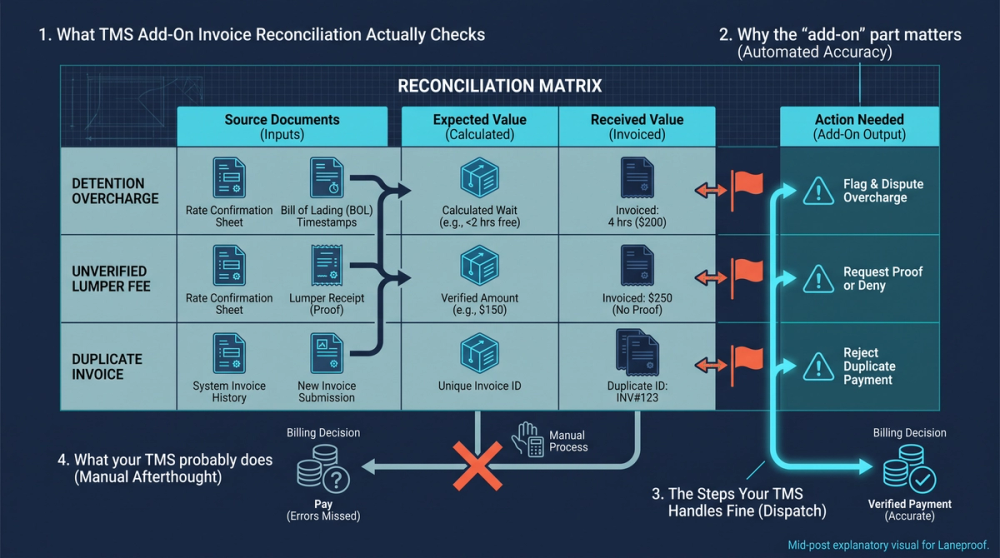
Scenario: Detention overbill caught by timestamp matching. A carrier submits a detention charge of 4 hours at $75/hour ($300 total). Your billing coordinator accepts it because the TMS only sees a $300 accessorial on the invoice and a $300 allowance on the rate con. But when you pull the BOL timestamps, they show the driver arrived at 10:15 AM and was released at 12:20 PM. That's just over 2 hours. The legitimate detention charge is $150, not $300. A reconciliation add-on that cross-references the invoice against BOL timestamps catches the $150 overcharge instantly. Your TMS, which doesn't parse BOL time fields, passes it through.
Lumper fees that weren't on the rate con
Lumper fees are supposed to be agreed upon in advance or at least communicated and approved before the carrier includes them on the invoice. In practice, carriers frequently attach lumper receipts to invoices without any prior authorization.
Scenario: Unapproved lumper fee slips through. A carrier submits an invoice that includes a $385 lumper fee with an attached receipt. The receipt is legitimate (a lumper was paid at a warehouse). But the original rate con for this load contained no lumper fee allowance and no notes authorizing one. Without an add-on that cross-checks every invoice line item against the rate con, this $385 charge passes through unchallenged. Multiply that by even 5 loads per month and you're looking at $1,925 in unapproved charges, every month, from one charge type.
Fuel surcharge percentage mismatches
Fuel surcharges are percentage-based, which means even small discrepancies multiply quickly across volume.
Scenario: FSC rate doesn't match the rate con. A carrier applies a 28% fuel surcharge on an invoice, but the rate con locked in a 24% FSC. On a $1,200 linehaul, the difference between 28% ($336) and 24% ($288) is $48 per load. If you're running 200 loads per month with this carrier, that's $9,600 per month in fuel surcharge overbilling. Your TMS checks whether a fuel surcharge exists. It doesn't typically validate whether the percentage matches what was contractually agreed.
How a Purpose-Built Add-On Checks What Your TMS Ignores
A TMS add-on reconciliation tool doesn't reinvent the wheel. It takes the data your TMS already stores and applies audit logic to it that your TMS vendor never prioritized building. Here's the step-by-step process:
Step 1: Ingest the carrier invoice
The add-on pulls the carrier invoice (from email, EDI, or portal upload) and parses every line item: linehaul, fuel surcharge, detention, lumper, layover, TONU, and any other accessorial. This isn't OCR guesswork. It's structured data extraction that reads invoice formats the tool has been trained on.
Step 2: Match against the rate confirmation
Each parsed line item is compared against the corresponding rate confirmation. Not just the total. Every line. If the rate con says linehaul is $1,800 with a 24% FSC and no accessorials, but the invoice shows $1,800 linehaul, 28% FSC, $300 detention, and a $385 lumper fee, the add-on flags three discrepancies before a human ever looks at it. This is the core difference between what most people understand about invoice reconciliation in freight and what actually needs to happen for it to protect your margins.
Step 3: Cross-reference supporting documents
For flagged items, the add-on checks supporting documents. Detention claims get compared against BOL timestamps. TONU charges get checked against dispatch acceptance records. Lumper fees get verified against rate con notes and pre-approval records. This is where an automated tool that flags invoice discrepancies saves the most time. A billing coordinator doing this manually has to open 3 to 5 documents per load, visually compare timestamps and dollar amounts, and make a judgment call. The add-on does the comparison in seconds and presents the variance with the supporting evidence already attached.
Step 4: Flag, hold, or approve
Clean invoices (no discrepancies found) get approved automatically. Invoices with discrepancies get held with a clear summary of what's wrong: which line item, what the rate con says, what the invoice says, and the dollar variance. The billing coordinator reviews the flagged items, not the entire invoice stack. That's the difference between spending 12 hours a week on invoice matching and spending 2.
Step 5: Duplicate and TONU detection
Scenario: Duplicate invoice with different reference numbers. A carrier submits invoice #4471 tied to load reference LPR-9823. Two weeks later, the same carrier submits invoice #4471 again, but this time it references load LPR-9823-R. Native TMS systems without exact-match duplicate detection pass both for payment 34% of the time because the load reference numbers don't match exactly. A reconciliation add-on catches this by matching on multiple fields: carrier name, invoice number, date, linehaul amount, and origin/destination. If four of five fields match, it flags the duplicate for review.
Scenario: TONU billed on a load that was actually moved. A carrier submits a TONU (truck ordered, not used) charge of $350. But the TMS dispatch log shows the driver accepted the load and the load was picked up and delivered. The reconciliation add-on checks the invoice charge type against the dispatch status. TONU on a delivered load? Flagged within seconds. Without that cross-check, a busy billing coordinator might approve the TONU charge without realizing the load was completed under a different invoice.
Running Reconciliation Across Multiple Carriers Without Losing Your Mind
The scenarios above get complicated fast when you scale from one carrier to 50 or 100. Each carrier has its own invoice format, its own accessorial naming conventions, its own billing cadence. A carrier might call it "waiting time" instead of "detention." Another might lump fuel surcharge into the linehaul total instead of breaking it out. A third might submit invoices as PDF attachments, while a fourth uses a carrier portal.
The multi-carrier problem
In a Reddit thread where freight brokers discussed how they handle invoice reconciliation, the responses painted a consistent picture: email threads, Excel spreadsheets, and margin checks done load by load. One commenter described pulling invoices from email, comparing them to rate cons in a spreadsheet, and flagging issues by hand. At 100 loads per month, that's tedious. At 500 or 1,000 loads per month, it's impossible to do accurately.
A multi-carrier reconciliation add-on normalizes invoice data across formats. Whether the carrier submits a PDF, an EDI 210, or a line item in a portal, the tool parses it into a standard structure and runs the same audit logic against the rate con. The carrier's format preferences don't change the audit; they just change the ingestion method.
The labor math

Consider the billing coordinator spending 12 hours per week on manual invoice matching. At $22/hour (a reasonable rate for this role at an SMB brokerage), that's $264/week or $13,728/year in labor cost. And that number only accounts for the time spent. It doesn't include the errors that slip through: the $150 detention overcharge, the $385 unapproved lumper fee, the $9,600/month in fuel surcharge discrepancies. The labor cost is the floor. The missed overbills are the ceiling, and the ceiling is always higher.
A billing coordinator spending 12 hours per week on manual invoice matching loses $13,728/year in labor cost alone, not counting the errors that still slip through.
Laneproof's reconciliation engine checks each of these fields automatically, flagging variances before payment goes out. The goal isn't to eliminate the billing coordinator. It's to stop them from spending 80% of their time on loads that have zero discrepancies so they can focus on the 10 to 15% of invoices that actually need human review. For a closer look at how this compares to other options, see this breakdown of the best invoice reconciliation tools for freight brokers.
Audit trails and dispute resolution
When you do find an overbill, the add-on gives you something your TMS doesn't: a documented audit trail. Every flagged discrepancy includes the rate con value, the invoice value, the variance amount, and the supporting document (BOL, POD, dispatch log) that proves the discrepancy. That's the difference between calling a carrier and saying "we think this detention charge is wrong" and sending them an email with the exact timestamps, the exact dollar amounts, and the exact rate con clause they agreed to. The first gets pushback. The second gets resolved.
For brokers handling carrier invoice disputes and overbilling patterns, having that documentation ready before you pick up the phone changes the dynamic entirely. You're not asking the carrier to explain their charge. You're showing them the evidence that the charge doesn't match the agreement.
Frequently Asked Questions
How do you do invoice reconciliation in freight?
Invoice reconciliation in freight means comparing each line item on a carrier invoice (linehaul, fuel surcharge, detention, lumper fees, accessorials) against the rate confirmation and supporting documents like the BOL and POD. Manually, this involves opening 3 to 5 documents per load, comparing numbers field by field, and flagging mismatches. With a TMS add-on, the process is automated: the tool ingests the invoice, parses every line item, matches it against the rate con, and flags discrepancies for review. The goal is to catch overbills before payment is approved.
What is TMS in the context of freight billing?
A TMS (Transportation Management System) is software that helps freight brokers, carriers, and shippers plan, execute, and track shipments. In ERP environments, TMS modules handle load tendering, dispatch, tracking, and basic invoicing. But as Cass Information Systems documents, most TMS platforms are not designed to perform detailed freight audit and payment functions. That's why add-on reconciliation tools exist: to fill the audit gap between what the TMS tracks and what your accounting team needs verified before paying a carrier.
Can AI reconcile freight invoices?
Yes, but the real question is what kind of AI and how it's applied. Basic AI (rules-based automation) can match invoice fields against rate con fields and flag mismatches. More advanced AI can learn carrier-specific invoice formats, detect patterns in overbilling (like a carrier that consistently inflates detention by 1 to 2 hours), and normalize accessorial naming conventions across hundreds of carriers. The key is that AI reconciliation works best as a layer on top of your TMS data, not as a standalone system. It needs the rate con, the BOL timestamps, and the dispatch logs to make accurate comparisons.
What's the difference between native TMS reconciliation and an add-on?
Native TMS reconciliation typically compares the invoice total against the rate con total and flags large-dollar mismatches. An add-on goes deeper: it checks every line item (linehaul, FSC percentage, detention hours, lumper fees, TONU validity, duplicate submissions) against the rate con and supporting documents. The add-on also provides audit trail documentation for disputes and can detect duplicate invoices submitted under slightly different reference numbers. Native TMS reconciliation is a necessary first step. An add-on is the detailed audit that catches what the first step misses.
How much does carrier invoice overbilling actually cost a mid-size brokerage?
The cost depends on volume, but the math is straightforward. If billing errors appear on roughly 3.8% of loads and your average linehaul is $1,800, a brokerage moving 500 loads per month faces approximately $34,200 in monthly overbilling exposure. Add fuel surcharge mismatches (potentially $9,600/month at 200 loads), unapproved lumper fees, and duplicate invoices, and the total can easily exceed $40,000 per month. Even catching half of those discrepancies pays for a reconciliation add-on many times over.
Stop Paying for Errors Your TMS Can't See
Your TMS does what it was designed to do: move freight, track loads, and process payments. It was never designed to audit carrier invoices at the line-item level, cross-reference detention claims against BOL timestamps, or catch duplicate submissions disguised under different load reference numbers. Those are reconciliation tasks that require a purpose-built tool sitting on top of your TMS, reading the same data, and applying audit logic your TMS vendor never prioritized.
The dollar amounts are specific and they add up fast: $150 detention overcharges, $385 unapproved lumper fees, $9,600/month in fuel surcharge discrepancies, $13,728/year in manual labor costs. Every one of those numbers represents money that either stays in your operation or leaves it, depending on whether someone (or something) is checking.
If you want to see what those checks look like against your own invoices, Laneproof's reconciliation tool runs every audit step described in this article automatically, from rate con matching to duplicate detection. You can also review pricing to see what it costs relative to what it catches.
Sources
- How to Justify the Cost of a TMS by Automating Freight Payment — IBM
- How Connected TMS and Freight Audit Solve Supply Chain Complexity — Infios
- 9 Reasons Logistics & Finance Leaders Don't Rely on TMS for Freight Audit and Payment — Cass Information Systems
- Reconcile Freight in Transportation Management — Microsoft Dynamics 365
- FMCSA Regulations and Interpretations — Federal Motor Carrier Safety Administration
- TMS Limitations in Freight: Workflow Gaps Costing You Money — Laneproof
- How Are You Handling Invoice Reconciliation Today? — Reddit r/FreightBrokers