Straight Bill of Lading Automation: Fields That Break Your TMS
Researched and written with AI assistance. Reviewed by the Laneproof team.

A two-character typo in a PO number can hold a $2,400 invoice for three days. Not because anyone disputed the freight, but because the number on the signed BOL did not match the number in the TMS, and the auto-match rule kicked the load into a manual review queue where it sat behind 40 other exceptions.
That is the real story of straight bill of lading automation. Every other guide explains what a straight BOL is and then jumps to "automate it and save time." The part nobody writes about is the field level: which specific boxes on the document break the match, why they break, and what to do about it before you buy software that promises to read them. The legal side is well settled. 49 CFR Part 1035 prescribes the uniform straight bill of lading form for common carriers, and the required data elements are documented. The operational side is where loads stall.
This article covers the six fields that cause most automation failures, how to fill out a straight BOL so your system does not choke on it, and the questions to ask any vendor before you hand over your document flow.
The bottleneck isn't the BOL. It's re-keying the BOL.
Ask an ops manager where the week goes and you will hear the same answer: typing. Load comes in, rate con gets keyed, driver sends a photo of the signed BOL at 9:40 p.m., someone opens it the next morning and re-types the piece count, weight, delivery date, receiver signature status, and any handwritten notes into the TMS so billing can invoice. Multiply that by 300 loads a month and you are staffing a full-time data entry role you never budgeted for.
Run your own numbers. If two people spend a combined 6 to 8 hours a week re-keying BOL data at a loaded rate of $22 an hour, that is $132 to $176 a week, or roughly $6,900 to $9,200 a year in labor that produces no margin. It is worse than that, because the re-keying happens after the load delivers, which pushes your invoice date out and stretches DSO.
The compliance requirements themselves are not the obstacle. FMCSA's CSA guidance on bill of lading requirements spells out the data elements a carrier must carry on the document, and 49 CFR 375.505(b) lists 17 specific items for household goods shipments. Nothing in those rules mandates paper. As practitioner guides on bill of lading legal requirements point out, the requirement is that the mandated information be present and available, not that it live on a triplicate carbon form. Digital and automated handling is legal.
So if the law allows it and the software exists, why do so many ops teams still re-key? Because the automation works right up until a field does not match, and then a human has to figure out why. Get the fields right and the automation holds. Get them wrong and you have bought yourself a new exception queue.
What is a straight bill of lading? (And why it's not the same as a negotiable one)
A straight bill of lading is a non-negotiable contract of carriage. It names one consignee, and only that named consignee (or its authorized agent) can accept the freight. Title does not transfer by endorsing or handing over the document. Compare that to a negotiable or "order" bill of lading, where the document itself represents control of the goods and can be endorsed to a third party, which is why order BOLs show up in ocean freight, letters of credit, and drayage moves tied to trade finance.
As explained in this straight bill of lading overview, the non-negotiable structure means the consignee field is not a shipping detail. It is the legal delivery instruction.
Why this distinction matters for your automation rules
Most domestic truckload and LTL moves ride on a straight BOL, which is good news for automation: one named consignee, no endorsement chain, no title transfer logic to model. Your matching rules only have to answer three questions. Did the named consignee sign? Did the piece count and weight survive the trip? Do the reference numbers match the rate con?
Where teams get burned is applying straight-BOL logic to an order BOL, or vice versa. If a drayage move comes in on a negotiable BOL and your system auto-posts on any signature in the consignee box, you have no audit trail showing the right party took delivery. Build a document type flag first, then route straight BOLs to the auto-post path and negotiable BOLs to a reviewed path. That single rule prevents most of the ugly exceptions.
The three things a straight BOL has to prove
- Tender: what the shipper handed over, in what quantity, at what weight, with what description and freight class.
- Delivery: that the named consignee received it, when, and in what condition (clean or with exceptions noted).
- Reference: the numbers that tie the document to your load record and to the carrier invoice (BOL number, PO, pickup number, load number, pro number).
Automation lives or dies on the third one. Tender and delivery are usually legible. References are where the transpositions happen.
The 6 fields that break straight BOL automation, with real examples
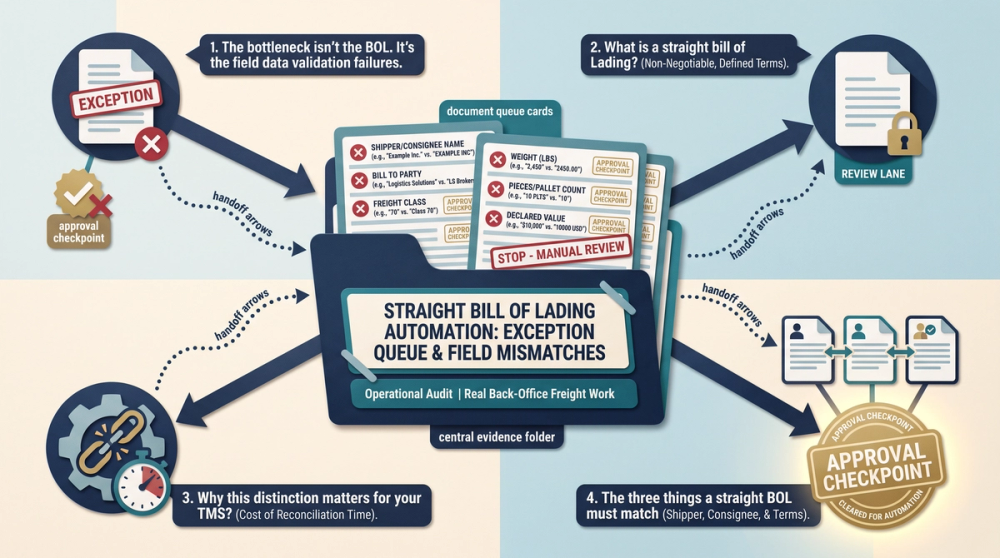
Here are the specific boxes that generate exceptions, ranked by how often they cause an invoice to sit. The mid-post diagram shows the same mapping visually: BOL field on the left, TMS field on the right, and the mismatch types that trip the rule.
1. Consignee name and legal entity suffix
Example: the signed BOL reads "ABC Logistics." Your TMS has the customer as "ABC Logistics LLC." A strict string match flags a mismatch, the load drops to manual review, and invoice approval slips 2 to 3 days while somebody confirms it is the same company. Nothing was wrong with the freight. The suffix was missing.
Fix: fuzzy match on consignee with a normalized alias table. Strip LLC, Inc., Corp., Co., and punctuation before comparing, and store known DBAs against the customer record. Match on address plus normalized name rather than name alone.
2. Weight and unit of measure
Example: the shipper writes weight in short tons on the BOL. Your TMS field expects pounds. A 21-ton load posts as 21 pounds, the freight class recalculates on density, and you inherit a $340 reclass and accessorial dispute that takes two emails and a phone call to unwind. The document was not wrong. The unit assumption was.
Fix: never accept a bare number into a weight field. Capture the unit as its own extracted value, default to pounds only when the document explicitly says LBS, and set a sanity range (a dry van truckload weight outside 500 to 48,000 lbs is an automatic flag, not an auto-post).
3. PO number and reference numbers
Example: PO 10394 gets keyed or read as 10934. The carrier invoice references the correct PO, auto-matching rejects it, and resolution takes about 45 minutes per load between pulling the signed BOL, comparing it to the rate con, and correcting the record. Do that on 5 percent of a 400-load month and you have spent nearly 15 hours on typos.
Fix: validate reference numbers against the rate con at intake, not at invoice time. If your rate con says PO 10394, the accepted values on the BOL are 10394 and nothing else. Check digits and length rules help: if a customer's POs are always five digits starting with 1, reject anything that is not.
4. Piece count and packaging type
Twenty-six pallets and 640 cases can describe the same shipment. If the BOL lists cases and your TMS load record lists pallets, an overage/shortage rule will fire on every load. Worse, when a receiver signs "short 2" it is critical to know two of what. Two pallets of paper towels versus two cases is the difference between a $60 claim and a $1,900 claim.
Fix: extract quantity and packaging unit as a pair, and store the customer's standard unit on the customer profile so the comparison is apples to apples. This is the same discipline that makes POD automation software work against carrier overbilling: the count on the delivery document has to be comparable to the count on the tender.
5. Freeform special instructions and accessorial notes
Detention, lumper fees, inside delivery, and driver-assist notes usually get handwritten in the margin: "arr 0730 depart 1145 lumper $175." That single line contains three billable facts and zero structure. If your extraction only reads printed boxes, you lose the detention window and the lumper receipt reference, and the carrier's invoice for $175 in lumper plus two hours of detention arrives with no backup you can verify.
Fix: treat the notes block as a required extraction zone with pattern rules for times, dollar amounts, and keywords (lumper, detention, TONU, layover, dry run). Flag any dollar amount found in a note field for human confirmation before it posts. This is the same failure pattern covered in our breakdown of where the money leaks in freight document automation.
6. Signature block, date/time stamps, and notify party
Scenario: a non-negotiable straight BOL arrives with a legible receiver signature but no notify party filled in, and the delivery time box is blank because the receiver initialed the seal line instead. The automation cannot confirm delivery time for a detention calculation and cannot confirm which party was notified, so it routes the document to manual review instead of auto-posting. One blank box costs you the whole automated path.
Fix: define which fields are blocking and which are non-blocking. A missing notify party on a domestic dry van straight BOL should not block posting if the consignee signature and delivery date are present. A missing delivery time on a load with a detention claim absolutely should. Configure it deliberately instead of accepting a vendor default that flags everything.
Automation does not fail because the software cannot read the document. It fails because two systems store the same fact in two different shapes, and nobody decided which shape wins.
How to fill out a straight bill of lading so your TMS doesn't choke on it
If you control the BOL (and as a broker or asset carrier, you often do), fill it out the way your system reads it. Here is the field-by-field discipline.
- Shipper: full legal name, street address, city, state, ZIP. No abbreviations that are not in your alias table.
- Consignee: the exact legal entity name as it appears in your TMS customer record, including the suffix. If the site is a DBA, write both: "Midwest Cold Storage LLC dba MCS Dock 4."
- Notify party: fill it in even when it feels redundant. It costs three seconds and prevents a routing exception later.
- BOL number: unique, printed, and matching the rate con. Never handwrite it if you can print it.
- Reference numbers: PO, pickup number, load number, each in its own labeled box. Do not stack three numbers in one field separated by slashes.
- Commodity description, NMFC and class: written out, not implied. Class disputes are the most expensive accessorial fights in LTL.
- Quantity and packaging: "26 PLT" not "26." Include both the handling unit count and the piece count when they differ.
- Weight with unit: "42,000 LBS." Always print the unit.
- Freight charge terms: prepaid, collect, or third party, checked clearly. An unchecked box is a billing dispute waiting to happen.
- Signatures and times: shipper signature with pickup date and time, consignee signature with delivery date and time, plus any exception noted in the condition line.
The pre-dispatch check that saves the most time
Before the driver leaves the shipper, compare three fields on the BOL to the rate con: consignee name, reference numbers, and weight with unit. Those three account for the majority of downstream match failures. Catching a wrong PO at the dock takes 30 seconds. Catching it after the invoice rejects takes 45 minutes and a phone call. Practical automation guides such as this bill of lading automation walkthrough make the same point about validating at capture rather than at posting: every step you push the error downstream multiplies the cost of fixing it.
Can I create my own bill of lading? What automation tools actually need
Yes. You can create your own bill of lading, and most brokers and carriers do. There is no requirement to buy a pre-printed form. What matters is that the document contains the required information and, for common carriers, follows the uniform straight bill of lading terms prescribed in 49 CFR Part 1035 Appendix A and B. Household goods movers have a stricter list: 49 CFR 375.505(b) enumerates 17 specific items that must appear.
Electronic versions are equally valid. Vendors building electronic bill of lading software for US carriers design around the same Uniform Straight Bill of Lading content requirements, which is exactly the point: the format can change, the content cannot.
Design your form for machine reading
If you are building your own template, a few choices make automation dramatically more reliable:
- Print every value you already know (consignee, references, commodity, class, charge terms) so the only handwriting on the document is signatures, times, and exceptions.
- Put the BOL number in the same absolute position on every page, and add a barcode or QR code encoding the BOL and load number.
- Use one labeled box per data element. Combined fields are the number one cause of extraction errors.
- Keep the notes block in a fixed, generous rectangle so handwritten detention times and lumper amounts land inside a defined zone.
- Include a delivery time box separate from the delivery date box. Detention math needs both.
A template designed this way turns a 3 to 5 percent handwriting error problem into a signature-only problem, because the fields that matter for matching are already printed and verified.
What is the best software for creating bills of lading?
There is no single best answer, and any vendor who says otherwise is selling. The honest answer depends on where the BOL originates and what has to happen to it afterward. Four categories, with the tradeoffs:
Category 1: Your TMS
If your TMS generates BOLs from load data, use it. The reference numbers, consignee name, and weight come straight from the load record, which eliminates the mismatch class of errors entirely. Weakness: TMS-generated BOLs often do not handle the return trip well. The signed copy comes back as a photo and still needs extraction.
Category 2: eBOL and electronic proof of delivery platforms
Driver-app based eBOL tools capture signatures, times, and exception photos as structured data, which is the cleanest possible input for automation. Weakness: they only work when the shipper and receiver cooperate. Plenty of docks still demand paper, and drayage terminals are the worst offenders.
Category 3: Document AI and freight OCR
Pre-trained extraction models exist specifically for this document type. ABBYY, for example, publishes a pre-trained bill of lading document skill, and OCR-focused guides walk through the extraction and matching pipeline for BOL automation in technical detail. This is the right category when documents arrive from hundreds of different shippers on hundreds of different templates. Weakness: accuracy on handwritten fields. Every serious vendor in this space flags handwriting as the hardest case, which is why you should plan operationally around a field-level error rate in the low single digits on handwritten boxes. At 3 to 5 percent, roughly 1 in 20 to 1 in 30 loads needs a human touch. That is a manageable exception queue, but only if you staff for it.
Category 4: Workflow and reconciliation layers
This is the layer that compares the extracted BOL data against the rate con and the carrier invoice and flags variances. Automation guides on BoL workflow automation and labor savings focus on the extraction step, but extraction alone just moves data faster. The savings show up when the comparison is automatic, which is the argument behind carrier billing dispute automation that closes cases in 30 minutes.
The five questions to ask any vendor
- What is your field-level accuracy on handwritten fields, not document-level accuracy on printed ones?
- Can I configure which fields block auto-posting and which do not?
- Do you extract the unit of measure separately from the numeric value?
- Can you fuzzy match consignee names against my customer table, including DBAs and entity suffixes?
- What happens to a document that fails extraction: does it show me the image side by side with the extracted values, or does it just dump it in a folder?
Signed BOL vs. system data: closing the gap between paper and your TMS
The signed BOL is your carrier invoice backup. It is the document that decides whether a detention charge is payable, whether a shortage claim survives, and whether a reclass sticks. So the goal is not just to read it faster. The goal is to reconcile it against what your system already believes.
A three-way match, not a two-way match
Most teams compare the carrier invoice to the rate con. That catches rate errors and unauthorized accessorials, but it misses everything the document proves. A three-way match compares:
- Rate con: agreed linehaul, fuel surcharge, accessorial authorizations, reference numbers, appointment windows.
- Signed BOL and POD: actual arrival and departure times, piece count received, exceptions noted, consignee signature, lumper receipt reference.
- Carrier invoice: what is actually being billed, line by line.
A carrier bills two hours of detention at $75 per hour. The rate con authorizes detention after two free hours. The signed BOL shows arrival 07:30 and departure 11:45, which is 4 hours 15 minutes, so 2 hours 15 minutes is chargeable. The $150 invoice is legitimate and you pay it same day instead of holding it a week. In the reverse case, the BOL shows a 90-minute dwell, the detention line gets denied with the document attached, and the dispute closes in one email rather than three.
Structure the fields once, then stop touching them
The durable fix is a field map that lives in writing: every BOL field, the TMS field it feeds, the accepted format, the accepted units, and whether a mismatch blocks or warns. Build it once with billing and ops in the same room. It usually takes an afternoon and it is the single highest-return hour of work in this entire project. Teams that skip this step end up with the same problem described in our guide to ending manual BOL data entry: automated capture feeding a queue that a human still reviews line by line.
Three scenarios with the math
Scenario 1: The consignee suffix
A 320-load month. Signed BOLs come back with consignee names typed by the shipper's dock clerk. About 8 percent (26 loads) are missing the entity suffix or use a DBA. Under a strict match rule, all 26 route to manual review. Each takes 6 minutes to clear, which is 2.6 hours of ops time, and each invoice goes out an average of 2 days late. Add a normalized alias table with suffix stripping and 24 of those 26 auto-clear. Recovered: roughly 2.4 hours a month and 48 load-days of DSO.
Scenario 2: The weight unit
An LTL shipment tenders at 21 short tons. The BOL notes tonnage, the TMS field is pounds, and the load posts at 21 lbs. Density calculates absurdly low, class recalculates, and the carrier bills a reclass plus a rehandling accessorial totaling $340. Resolution requires pulling the original BOL, proving the unit, and getting a corrected invoice. Elapsed time: 3 business days and about 70 minutes of combined ops and billing effort. A single unit-of-measure validation rule with a 500 to 48,000 lb sanity range prevents the entire chain.
Scenario 3: The transposed PO
PO 10394 becomes 10934 on the signed BOL. The carrier invoice references 10394. Auto-matching rejects it. Resolution takes 45 minutes: locate the load, pull the BOL image, compare to the rate con, correct the reference, re-run the match, notify the carrier that payment is proceeding. Assume this hits 4 percent of 320 loads, or 13 loads a month. That is 9.75 hours a month, roughly $215 in labor at $22 an hour, plus 13 carrier relationships mildly irritated. A check-digit and length rule on customer reference numbers at intake catches most of it before dispatch.
None of these three scenarios involves a bad carrier, a bad shipper, or bad software. All three are field-shape problems. That is the whole point.
Frequently Asked Questions
What is a straight bill of lading?
A straight bill of lading is a non-negotiable contract of carriage that names one specific consignee. Only that named consignee or its authorized agent can accept the freight, and the document cannot be endorsed to transfer title. Common carriers use the uniform form prescribed by 49 CFR Part 1035. Most domestic truckload and LTL freight moves on a straight BOL, which is why it is the easiest document type to automate: one consignee, no endorsement chain.
How do I fill out a straight bill of lading correctly?
Complete the shipper and consignee legal names and full addresses, the notify party, a unique BOL number, each reference number in its own labeled box, the commodity description with NMFC and freight class, quantity with packaging unit, weight with the unit printed, and the freight charge terms box (prepaid, collect, or third party). Then capture signatures with both date and time at pickup and delivery, and note any condition exceptions in writing. Print everything you already know and leave only signatures, times, and exceptions to handwriting.
Can I create my own bill of lading?
Yes. There is no requirement to use a pre-printed form, and electronic versions are acceptable as long as the mandated information is present. Common carriers should follow the uniform straight bill of lading terms in 49 CFR Part 1035, and household goods movers must include the 17 items listed in 49 CFR 375.505(b). If you build your own template, design it for machine reading: one labeled box per data element, a barcode for the BOL number, and a fixed rectangle for handwritten notes.
What is the best software for creating bills of lading?
The best option is whatever generates the BOL from your existing load data, because that removes the mismatch problem at the source. That usually means your TMS or an eBOL app your drivers already use. For inbound documents from shippers you do not control, you need a freight OCR or document AI layer plus a reconciliation step that compares extracted BOL data to the rate con and the carrier invoice. Judge vendors on handwritten field accuracy and configurable blocking rules, not on marketing accuracy claims.
How accurate does BOL extraction need to be before I trust it?
Accuracy matters less than exception design. Plan for a low single-digit field-level error rate on handwritten boxes, meaning roughly 1 in 20 to 1 in 30 loads needs a human look. What determines whether that is workable is how the system surfaces failures: you want the document image and the extracted values side by side, with the specific mismatched field highlighted, so a correction takes 20 seconds instead of five minutes.
Sources
- 49 CFR Part 1035 - Bills of Lading — Electronic Code of Federal Regulations, U.S. Government Publishing Office
- 10.14 Bill of Lading Requirements — FMCSA CSA Safety Planner
- Bill of Lading Guide and Process Automation — iCustoms
- Bill of Lading Automation, ABBYY Vantage Document Skill — ABBYY
- The Ultimate Guide for Creating and Automating a Bill of Lading — Docsumo
- Electronic Bill of Lading Software for US Carriers — Dashdoc
- Bill of Lading Legal Requirements To Stop Freight Disputes — Vector
- Bill of Lading Automation: OCR, Extraction, and Matching — Invoice Data Extraction
- Bill of Lading Automation: Steps, Examples & Best Practices — Artsyl Technologies
What to do this week
Straight bill of lading automation is not a software problem first. It is a field-shape problem. Pull the last 20 signed BOLs that got kicked to manual review and write down which field failed on each one. You will almost certainly find the same six suspects: consignee name, weight unit, reference numbers, piece count and packaging, handwritten accessorial notes, and missing signature or time stamps. Fix the map, standardize your template, and set your blocking rules deliberately. That work costs an afternoon and it is what makes any tool you buy afterward actually hold.
Once the field map is written down, automated capture is the easy part. If your team is re-keying more than a few hundred BOLs a month, freight document data extraction that pulls those fields and compares them to the rate con before the invoice lands is where the hours come back.