Freight Document Digitization: 45 Minutes Down to 3
Researched and written with AI assistance. Reviewed by the Laneproof team.
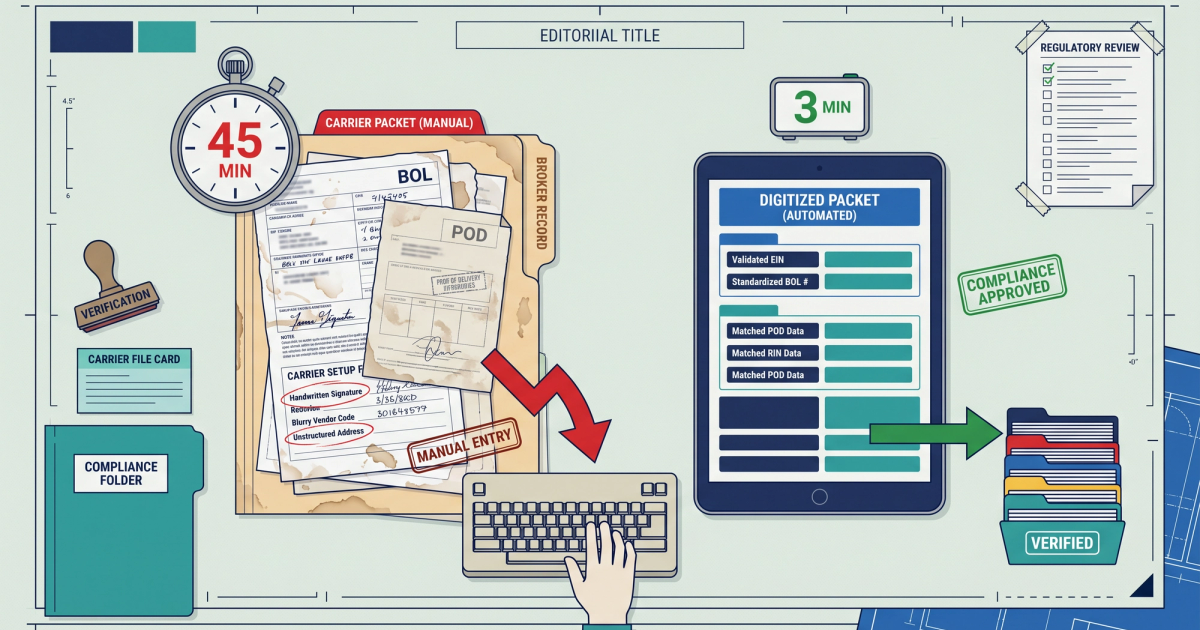
A billing coordinator making $22/hour takes 45 minutes to fully key one carrier packet into a TMS. That's $16.50 in labor per load, before anyone checks whether the invoice is even correct. At 500 loads a month, you're spending $8,250 on typing.
Freight document digitization is supposed to fix that. Most of the time it half-fixes it, because the fields that matter most (detention start and end times, lumper fee amounts, accessorial descriptions) are the exact fields optical character recognition handles worst. You end up with a system that reads the easy stuff perfectly and quietly guesses on the expensive stuff.
This guide goes field by field. Which parts of a BOL, POD, and rate confirmation extract cleanly. Which ones break and why. What per-document processing actually costs. And what a 45-minute packet looks like when it's down to three minutes, with the exceptions still getting human eyes.
Why Your Ops Team Is Still Typing
The document volume is the problem, not your team's speed. According to Symtrax research on logistics document automation, a single shipment's documentation can require up to 50 sheets of paper exchanged among as many as 30 parties. That's one load. Multiply by your monthly volume and the math stops being about typing speed.
It gets worse on the compliance side. Transport and logistics document compliance research from Checkfile notes that motor carriers must maintain between 20 and 40 distinct documents per vehicle and driver combination. Insurance certificates, W-9s, authority letters, drug and alcohol program enrollment, equipment inspection records. Every one of those has an expiration date somebody has to track.
So the daily reality for an ops manager at a 15-person brokerage looks like this: a shared inbox with 80 emails, each containing a scanned PDF that may or may not be legible, may or may not be the document the subject line claims, and may or may not match a load number in your TMS. Somebody opens each one, figures out what it is, finds the load, and types.
The cost isn't just the labor hours. It's that nobody has time to actually audit. When you're spending 45 minutes on entry, the accessorial verification step is the first thing that gets skipped, which is why detention and lumper overcharges slip through. We covered the specific places this bleeds money in where freight document automation money leaks.
Manual entry doesn't just cost you time. It costs you the audit step, because the audit step is always the first thing to get cut when the queue is backed up.
What Freight Document Digitization Actually Means (Not the Vendor Version)
Vendor definition: turning paper into digital files. That's scanning, and scanning alone does almost nothing for your ops team. A scanned PDF of a BOL sitting in a folder is still a document a human has to read and retype.
Working definition for freight operations: converting document images into structured, field-level data that lands in your TMS without a person typing it, with the low-confidence fields flagged for review instead of silently accepted.
That distinction matters because it changes what you evaluate. You're not asking "can this tool read my documents." You're asking "what percentage of fields land in the right TMS field at high enough confidence that I don't need to check them, and what happens to the rest."
The Four Levels of Digitization
- Level 1: Scanning. Paper becomes PDF. Searchable at best. Zero data extraction. Reduces filing cabinet space, not labor hours.
- Level 2: OCR text layer. The PDF becomes searchable text. You can Ctrl+F for a PRO number. Still no structured fields, still manual entry into the TMS.
- Level 3: Field extraction. OCR plus document classification and field mapping. The system identifies the document as a rate confirmation, finds the linehaul amount, and writes it to the right TMS field. This is where labor savings start.
- Level 4: Extraction plus reconciliation. Fields are extracted and then compared against what they should be. Rate con says $2,400 linehaul, invoice says $2,675, POD timestamps say the driver was on site 1 hour 40 minutes, not the 4 hours detention claimed. The system flags the gap.
Most brokerages that say they've "digitized" are at Level 1 or 2. The time bottleneck lives between Level 2 and Level 3.
Yes, Electronic Documents Are Legal
Ops managers ask this constantly, so here's the direct answer. The FMCSA's final rule on electronic documents and signatures, effective 2018, allows electronic records and signatures to satisfy regulatory requirements wherever a written record or signature is required. It permits, it does not mandate. Industry coverage of the FMCSA electronic signature rule walked through the same shift for driver-signed documents.
On what counts as a shipping document at all, the FMCSA guidance on documents that satisfy the shipping document number requirement accepts shipping manifests, invoices or freight bills, trip reports, and charter orders. That's broader than most people assume, which matters when a carrier sends you something that isn't a textbook BOL.
The 3 Types of Freight Documentation You're Digitizing
Every document that hits your inbox falls into one of three buckets. Sorting them this way matters because each type has a different extraction difficulty and a different financial consequence when the data is wrong.
1. Shipment Documents (Proof of What Happened)
The bill of lading, proof of delivery, delivery receipts, packing lists, weight tickets, and scale tickets. These prove the freight moved, when it moved, what condition it was in, and who signed for it.
Extraction difficulty: high. BOLs have no standard format. A Walmart BOL, a small manufacturer's carbon-copy BOL, and a carrier-generated BOL put the same information in completely different places. Handwriting shows up constantly on POD signature blocks and arrival/departure times.
Financial consequence when wrong: this is your detention evidence. If the POD arrival timestamp doesn't extract correctly, you can't dispute a detention charge. We broke down the specific failure points in document processing for freight brokers and where BOL errors cost you.
2. Commercial Documents (Proof of What It Costs)
Rate confirmations, carrier invoices, freight bills, lumper receipts, accessorial invoices, fuel surcharge schedules, and detention billing. These define the money.
Extraction difficulty: medium for rate cons (usually system-generated, consistent layout per broker), high for accessorial invoices and lumper receipts (often handwritten, stamped, or photographed on a phone in a dark dock).
Financial consequence when wrong: direct margin loss. A missed $275 lumper overcharge is $275 straight off the load.
3. Compliance and Carrier Qualification Documents (Proof You're Allowed to Do This)
The carrier packet: operating authority, certificate of insurance, W-9, broker-carrier agreement, safety ratings, drug and alcohol program certification, equipment lists. Plus hazmat certifications, customs paperwork for cross-border, and drayage-specific terminal documents.
Extraction difficulty: medium. Insurance certificates are semi-structured (ACORD forms have consistent layout). Authority letters and agreements vary.
Financial consequence when wrong: not per-load dollars, but catastrophic exposure. An expired cargo insurance certificate you didn't catch becomes your problem when a claim hits.
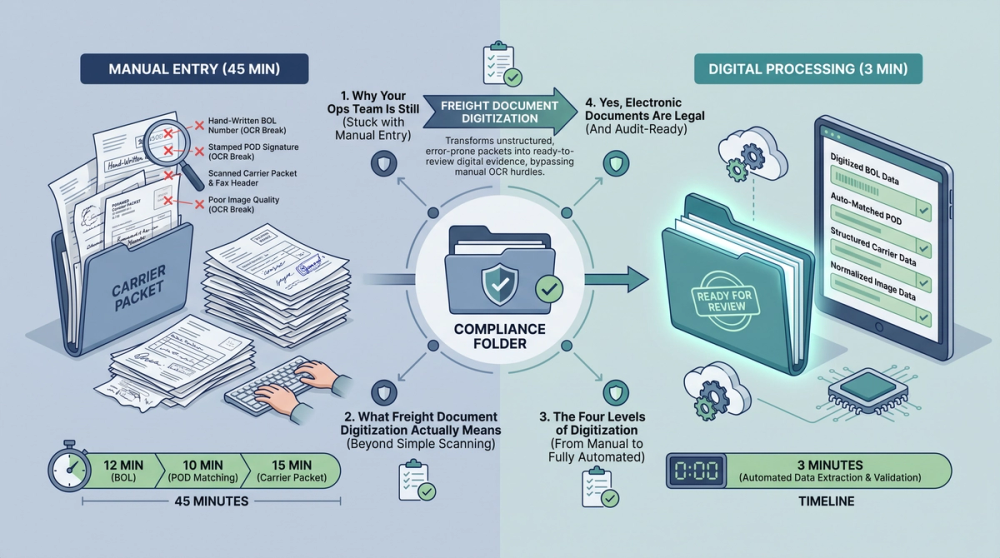
A Real Carrier Packet: 45 Minutes of Manual Entry, Line by Line
Here's where the 45 minutes actually goes on a single-stop dry van load with one accessorial. Timings reflect a trained coordinator working steadily, not someone learning the job.
BOL Entry: 12 Minutes
- Open PDF, identify document type, locate load in TMS: 2 minutes
- Shipper name, address, contact: 2 minutes
- Consignee name, address, contact: 2 minutes
- PRO number, BOL number, PO number, reference numbers: 2 minutes (frequently a re-read because reference number formats vary and one digit off breaks the match)
- Commodity description, piece count, weight, pallet count, class: 3 minutes
- Special instructions, freight terms, declared value: 1 minute
POD Matching: 10 Minutes
- Find the POD in the inbox or carrier portal, confirm it matches the BOL: 3 minutes
- Read handwritten signature block, decipher receiver name: 2 minutes
- Extract arrival time, departure time, delivery date: 3 minutes (this is the slow one, because the times are handwritten in a box the size of a stamp)
- Note any OS&D exceptions, damage notations, short counts: 2 minutes
Rate Con Cross-Check: 15 Minutes
The longest block, and the one most people underestimate. You're not entering the rate con, you're comparing three documents against each other.
- Pull rate confirmation, confirm carrier MC number matches the invoicing entity: 2 minutes
- Compare agreed linehaul against invoiced linehaul: 3 minutes
- Verify fuel surcharge calculation against the agreed schedule and mileage: 4 minutes
- Check stop count, stop-off charges, and whether any additional stops were authorized: 3 minutes
- Confirm payment terms, quick pay discount if applicable: 3 minutes
Accessorial Verification: 8 Minutes
- Read the lumper receipt, extract amount and facility name: 2 minutes
- Compare detention claim against POD arrival/departure times and free time in the rate con: 4 minutes
- Confirm any layover, TONU, or dry run charge has supporting documentation: 2 minutes
Total: 45 minutes. At $22/hour fully loaded labor, that's $16.50 per packet. On 500 loads a month, 375 hours and $8,250.
And notice that the accessorial verification step, the only step that actually recovers money, is the last 8 minutes. When your queue is 200 packets deep on a Friday afternoon, guess which 8 minutes get skipped.
The Fields That Break OCR (And Why)
This is the part vendors skip. OCR for freight reads printed, high-contrast, consistently placed text extremely well. It reads everything else poorly. Here are the specific failure modes, ranked by how much money they cost you.
Handwritten Detention Start and End Times
The single most expensive extraction failure. Arrival and departure times on a POD are almost always handwritten by the driver or a dock worker, in a small box, often with a mix of 12-hour and 24-hour notation, sometimes with no AM/PM at all.
Why it breaks: handwriting recognition on numerals is materially harder than printed text, and "1:30" versus "7:30" is a six-hour swing. At $65/hour detention after two hours free, a misread digit is a $390 error in either direction. Generic OCR engines will return a value with no warning that the value is a coin flip.
Smudged or Stamped Lumper Receipts
Lumper receipts get stamped with facility marks, folded in a driver's pocket, then photographed under a dock light. The dollar amount is frequently overlapped by a stamp. OCR either drops the amount entirely or returns a partial figure. $275 becomes $27, or $2.75, or nothing.
Multi-Page BOLs With Inconsistent Field Placement
A three-page BOL where page one has the shipper block top-left and page three (the continuation for additional stops) has it top-right. Template-based OCR anchored to coordinates on page one returns garbage on page three. Multi-stop LTL and drayage documents are the worst offenders here.
Signature Blocks Overlapping Data Fields
A receiver signs across the printed "Total Weight" field. The OCR engine now sees ink strokes crossing digits and either returns nothing or returns a hallucinated number. This is why weight-based rebill disputes are so common on digitized documents that nobody reviewed.
Accessorial Descriptions in Free-Text Fields
"DET 3.5 HRS @ SHIPPER PER RATE CON" and "Detention - shipper - 3.5" and "Extra wait time 210 min" all mean the same charge. Extraction gets the text but not the meaning, so nothing maps to your accessorial codes in the TMS and a human has to classify it anyway.
On a sample rate confirmation set we've seen field-level accuracy differences this stark: a coordinate-template OCR approach returning 61% field accuracy versus a layout-aware extraction approach returning 94% on the same documents. In our review of extraction results across mixed carrier packets, the gap concentrates almost entirely in handwritten and stamped fields, not in printed ones. For a deeper look at exactly where the technology holds up, see what freight OCR reads accurately and where it breaks down.
Any digitization tool that reports one overall accuracy number is hiding the only number you care about: accuracy on the money fields.
The Same Packet in 3 Minutes: What Changed
Same load, same documents, working extraction pipeline. Here's the new timeline.
Minute 0 to 1: Automatic Classification and Matching
Documents arrive by email or carrier portal upload. The system classifies each one (BOL, POD, rate con, lumper receipt), reads the reference numbers, and matches the packet to the load in the TMS. No human touch. The four foundational technologies of a digital freight broker documentation from Descartes covers why document capture and TMS integration have to be treated as one system rather than two.
Minute 1 to 2: Field Extraction and Write-Back
Printed fields extract and write directly to the TMS: shipper, consignee, PRO, BOL number, PO, commodity, weight, piece count, linehaul, fuel surcharge, payment terms. These are the fields OCR handles well, and they represent roughly two-thirds of the manual entry time in the old workflow.
Minute 2 to 3: Exception Review
This is the only part a human touches. The screen shows three flagged items: a handwritten arrival time the system read as 08:15 with 71% confidence, a lumper amount partially obscured by a stamp, and a $275 accessorial with no matching description in the rate con. The coordinator confirms two, corrects one, and moves on.
That's 3 minutes. Forty-two minutes saved per packet. The important structural change isn't the speed, it's that the accessorial check moved from "last step, often skipped" to "the only step, always done."
The Volume Math
At 500 loads a month, 42 minutes saved per packet equals 350 hours per month recovered. At $22/hour, that's $7,700 in monthly labor. Two full-time equivalents of billing capacity, without hiring. For a 12-person brokerage, that's the difference between growing volume and hiring another coordinator.
Peer-reviewed research on the impact of digitizing transport documents published in Logistics found measurable effects of documentation digitization on road transport competitiveness and operational efficiency, not just administrative convenience. And a documented case of freight document digitization at JLE Industries shows the same pattern on the carrier side: faster document turnaround compressing the cash cycle.
What Digitization Actually Costs (Per Document, Per Month, Per Load)
Nobody publishes this, so here's the honest range based on what SMB brokers and carriers actually pay.
Per-Document Pricing
- Offshore manual keying (BPO): $0.40 to $1.50 per document depending on field count and turnaround SLA. Accuracy is high on handwriting but latency is 4 to 24 hours, and you're sending customer data offshore.
- Automated extraction (OCR plus AI): $0.35 to $1.20 per document. Sub-minute latency. Accuracy varies wildly by document type, which is why the exception queue exists.
- Hybrid (automated extraction plus human-in-the-loop on flagged fields): $0.60 to $2.00 per document. Usually the right answer for freight because of the handwriting problem.
- Pure scanning and archival (no extraction): $0.03 to $0.10 per page. Cheap, and it saves you almost no labor.
Per Load and Per Month
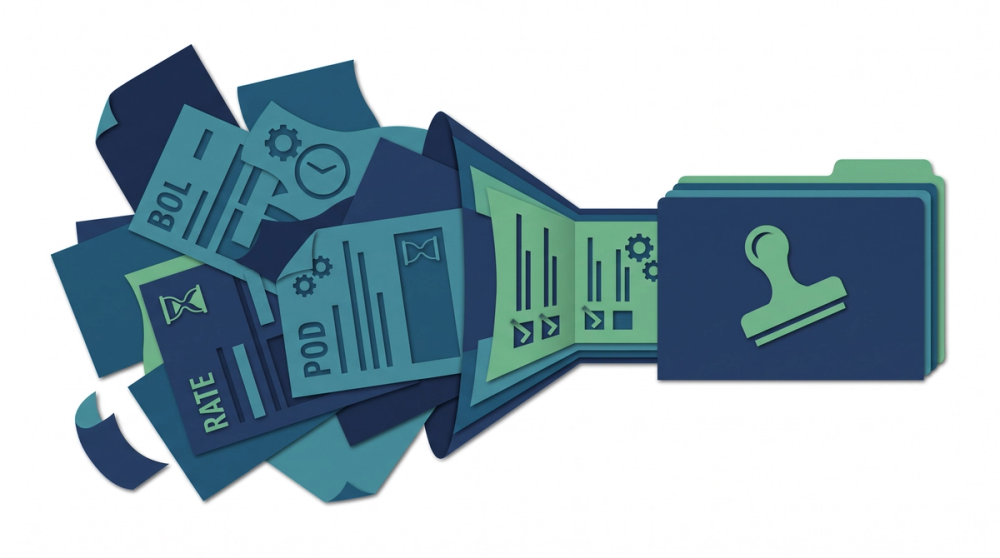
A typical carrier packet is 4 to 7 documents (rate con, BOL, POD, lumper receipt, sometimes a scale ticket and an accessorial invoice). At $0.75 average per document and 5.5 documents per packet, that's roughly $4.13 per load in processing cost.
Compare against $16.50 per load in manual labor. Net savings around $12.37 per load. At 500 loads: $6,185 monthly. At 2,000 loads: $24,740 monthly.
Add software subscription costs. Most freight document platforms run $300 to $2,500 per month for SMB volume tiers, sometimes bundled into per-document pricing, sometimes separate. Ask which. A $500/month platform fee on 500 loads adds $1.00 per load, which still leaves you well ahead.
The Costs Vendors Don't Quote
- Integration work. If your TMS has no API or a bad one, budget 20 to 60 hours of setup. Ask specifically whether write-back to your TMS is included or an add-on.
- Exception queue labor. If 25% of documents route to human review at 90 seconds each, that's real ongoing labor. Build it into your model. A vendor quoting 99% accuracy without defining it per-field is quoting a number you can't use.
- Training and template setup. Some tools require per-shipper template configuration. That's fine if you have 20 recurring shippers. It's a nightmare if you run spot freight with 400 different BOL formats.
How This Connects to Freight Audit and Catching Overbilling
Digitization on its own is a labor play. Digitization plus reconciliation is a margin play, and the margin play is bigger.
Once your rate con, POD, and carrier invoice all exist as structured fields in the same place, the comparison becomes mechanical. Rate con free time versus POD dwell time. Agreed linehaul versus invoiced linehaul. Lumper receipt amount versus lumper line item. Fuel surcharge schedule versus fuel surcharge charged. None of that requires judgment. It requires the fields to exist.
That's the reason the field-level accuracy on handwritten timestamps matters so much. A digitization project that nails shipper addresses and misses arrival times gives you faster data entry and zero audit capability. The whole recovery case rests on the fields that are hardest to read. If you're evaluating tools, the practical guide to stopping manual BOL data entry in freight ops walks through the workflow order that keeps the audit step intact.
Worked Examples
Scenario 1: The $275 Lumper That Didn't Happen
A carrier invoices a load at $2,890: $2,400 linehaul, $215 fuel surcharge, $275 lumper. The lumper receipt attached is a phone photo of a receipt with a facility stamp across the amount.
Manual path: coordinator is 180 packets deep, sees a lumper receipt is attached, approves. $275 paid.
Digitized path: extraction returns the lumper amount at 48% confidence and flags it. Coordinator opens the full image, reads the facility name, and notices it's a facility the load never routed through. The receipt belongs to a different load. Charge removed.
Recovery: $275. Processing cost for that packet: about $4. Return: 68x on that single load.
Scenario 2: Detention Math That Doesn't Add Up
Rate confirmation specifies 2 hours free at the consignee, then $65/hour detention. Carrier invoices 4 hours detention: $130 billable ($65 x 2 hours beyond free time). Wait, they invoiced $260, claiming 6 hours total.
POD shows handwritten arrival 13:20, departure 15:00. Actual dwell: 1 hour 40 minutes. Inside free time. Detention owed: $0.
Manual path: 4 minutes of cross-referencing that gets skipped on a busy day. $260 paid.
Digitized path: system extracts both timestamps, calculates 100 minutes dwell, compares against 120 minutes free time in the rate con, flags the $260 detention charge as unsupported. Coordinator sends the POD back to the carrier with the timestamps circled. Charge withdrawn.
Recovery: $260. And this is a repeat pattern, not a one-off. If that carrier does 40 loads a month with you and 15% carry an unsupported detention line, that's roughly $1,560 monthly at similar amounts.
Scenario 3: The Fuel Surcharge Drift
Rate con specifies fuel surcharge at $0.43/mile on 512 miles: $220.16. Carrier invoices $267.00, using $0.52/mile from an older agreed schedule.
Difference: $46.84. Small enough that nobody disputes it manually because the dispute costs more in time than the recovery.
Digitized path: the mileage and rate both extract cleanly (printed fields, high accuracy), the calculation runs automatically, and the $46.84 variance appears in a weekly exception report alongside 22 similar ones. Total: $1,030 in a month of small drift that was previously invisible.
This is the category most brokers miss entirely. Big overcharges get caught. Sub-$50 variances slip through 100% of the time in manual workflows because checking them is uneconomical. Automated field comparison changes the economics of small disputes.
Frequently Asked Questions
How much does it cost to have documents digitized?
For freight documents with field-level data extraction, expect $0.35 to $1.20 per document for automated processing, $0.40 to $1.50 for offshore manual keying, and $0.60 to $2.00 for hybrid automated-plus-human-review. Pure scanning with no extraction runs $0.03 to $0.10 per page but saves almost no labor. At 5.5 documents per typical carrier packet, that's roughly $2 to $8 per load versus about $16.50 for full manual entry at $22/hour labor cost.
What are the three types of freight documentation?
Shipment documents (BOL, POD, delivery receipt, weight tickets) prove what physically happened. Commercial documents (rate confirmation, carrier invoice, lumper receipt, accessorial billing) define the money. Compliance and carrier qualification documents (operating authority, certificate of insurance, W-9, broker-carrier agreement) prove you're legally permitted to move the load. Each type has different extraction difficulty and different financial consequences when the data is wrong.
What is digitalization in logistics?
Digitalization in logistics means converting paper-based and image-based processes into structured digital data that systems can act on automatically, rather than just storing digital copies. The practical difference: a scanned BOL is digitized paper, while a BOL whose weight, piece count, and reference numbers write directly into your TMS is digitalized workflow. Research published in Logistics on transport document digitization found measurable effects on road transport efficiency and competitiveness.
What is the fastest way to digitize documents?
For freight specifically: automated intake from email and carrier portals, layout-aware extraction rather than coordinate templates, direct TMS write-back for high-confidence fields, and a confidence-scored exception queue for everything else. That combination gets a 45-minute carrier packet to about 3 minutes. Coordinate-template OCR is faster to set up but breaks on the multi-page and variable-layout documents that make up most spot freight.
Do electronic freight documents hold up for FMCSA compliance?
Yes. The FMCSA's 2018 final rule on electronic documents and signatures permits electronic records and signatures to satisfy requirements wherever a written record or signature is required. It permits rather than mandates, so verify your specific document retention obligations and keep an audit trail showing when each document was received and any changes made after intake.
Sources
- What documents satisfy the requirement to show a shipping document number — Federal Motor Carrier Safety Administration
- Electronic Documents and Signatures (Final Rule) — Federal Register
- Four Foundational Technologies of a Digital Freight Broker — Descartes Systems Group
- FMCSA Proposes Rule to Allow Electronic Signatures on Documents — Trucking Info (HDT)
- The Impact of Digitization of Transport Documents — Logistics (MDPI)
- Transport & Logistics Compliance: Licenses, Permits, Documents — Checkfile
- How Can Document Automation Accelerate Logistics Processes — Symtrax
- JLE Industries Accelerates Growth with Freight Document Digitization — Vector
- Digital Transformation in Transport — Editel Group
The Takeaway
Freight document digitization is not a scanning project. It's a field-mapping project, and its value depends entirely on how well it handles the fields that are hardest to read: handwritten detention times, stamped lumper amounts, and accessorial descriptions that don't match any code in your TMS.
Get those right and two things happen at once. A 45-minute carrier packet becomes 3 minutes, which at 500 loads a month is 350 hours and roughly $7,700 in recovered labor capacity. And the accessorial audit step stops getting skipped, which is where the $275 lumpers and $260 unsupported detention charges start surfacing instead of quietly clearing.
Before you evaluate any tool, run your own numbers: time three real carrier packets end to end, multiply by monthly volume, and multiply by your loaded labor rate. That's your baseline. Then ask any vendor for field-level accuracy on handwritten timestamps specifically, not an overall percentage.
If your team is processing more than 50 packets a week and the exception review is the bottleneck, structured field extraction from freight documents is the piece that closes the gap between faster entry and actual dollar recovery.