Document Automation PDF: Which Freight Docs Save Time
Researched and written with AI assistance. Reviewed by the Laneproof team.
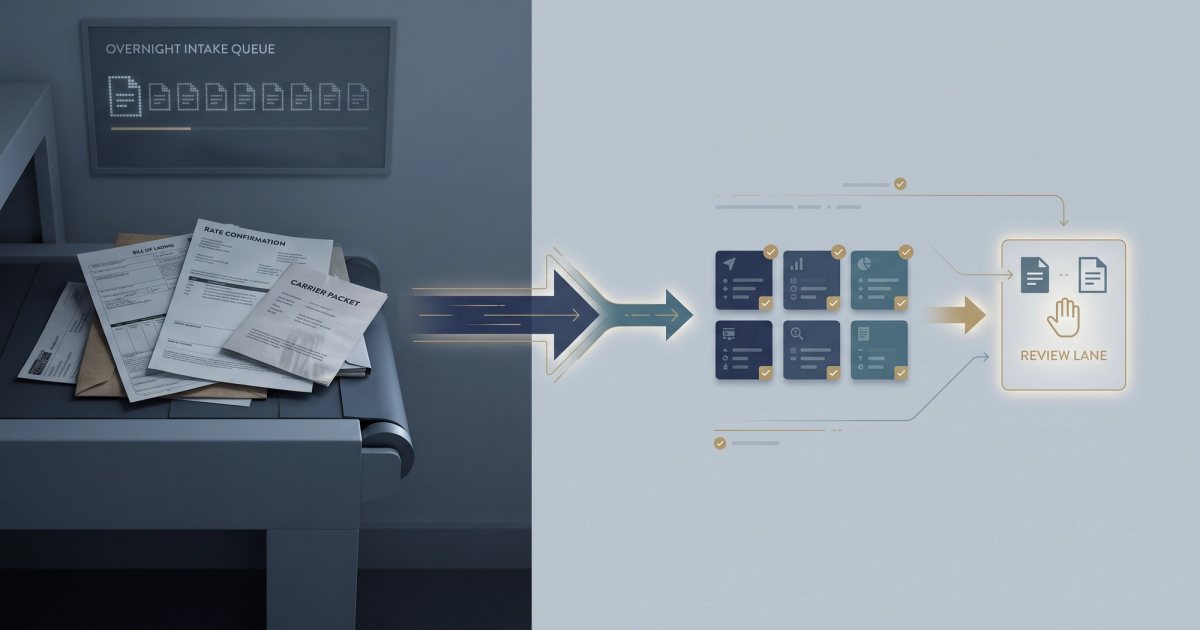
A single shipment can generate up to 50 sheets of paper passed among as many as 30 parties, according to Symtrax's breakdown of logistics document volume. Multiply that by 300 loads a month and your ops team is not managing freight, it is managing paper. Most document automation PDF tools on the market were built for HR onboarding packets and sales contracts, so they treat every file the same way. Freight does not work that way. A bill of lading has fixed fields and predictable structure. A rate confirmation has accessorial language buried in a notes box that changes with every broker. A carrier packet has signatures, insurance certificates, and W-9s that carry compliance weight. Automate the first one aggressively. Automate the second one carefully. Touch the third one with a human still in the loop.
This guide covers which freight documents give you real hours back, which ones cost you money when a machine gets them wrong, and how to build a fillable PDF yourself in under five minutes.
Your TMS Is Not the Bottleneck. The Keyboard In Front of It Is.
Ask any ops manager where the day goes and you will hear the same answer: rekeying. A driver texts a photo of a signed BOL. The billing coordinator opens it, squints at the piece count, opens the TMS, types the pro number, the weight, the piece count, the delivery date, the receiver name, then attaches the file and moves to the next one. Nothing about that workflow is broken in a way that shows up on a P&L line. It just quietly eats three to four minutes per document, all day, every day.
The volume math is brutal at small-broker scale. Per Symtrax's logistics document analysis, a forwarder moving 300 shipments a month can process 2,000 to 2,500 documents that require manual review and data entry. That is not 300 documents. That is a BOL, a POD, a rate con, a carrier invoice, a lumper receipt, a scale ticket, and an accessorial backup for each load. Every one of them lands as a PDF or a phone-camera JPEG that someone has to read and retype.
FreightWaves has covered how shipping document automation drives profitability, and the argument holds: the cost is not the labor hour by itself, it is the delay. Invoices that sit in a queue for four days because nobody has keyed the POD are invoices that age past the shipper's cutoff. Detention claims filed without the signed in-and-out times get denied. The paperwork lag becomes a cash flow lag.
The question is not whether to automate PDFs. It is which PDFs. Get that order wrong and you will spend six months fixing extraction errors on documents that were never the problem.
Can You Actually Automate a PDF? (Short Answer: Depends on the Document)
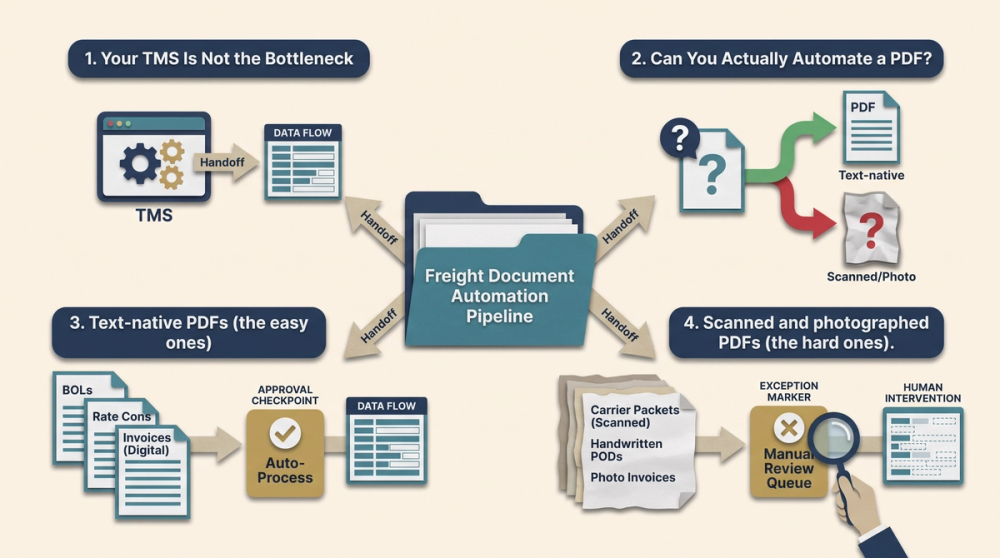
Yes, you can automate a PDF. What that means in practice depends entirely on how the file was created and how consistent its layout is. There are three kinds of PDFs moving through freight, and they behave completely differently.
Text-native PDFs (the easy ones)
These are generated by software: a rate confirmation exported from a TMS, a carrier invoice printed to PDF from QuickBooks, an EDI-driven load tender. The text is already encoded in the file. You can pull fields out with a parser, no optical character recognition required, and accuracy on clean text-native files is effectively a layout problem, not a reading problem. If 60 percent of your inbound documents are text-native, that is where your first automation dollar goes.
Scanned and photographed PDFs (the hard ones)
A driver's phone photo of a BOL taped to a warehouse counter, shot at an angle, half in shadow, with a coffee ring on the piece count. This requires OCR, and OCR quality varies enormously with image quality. Handwritten delivery notes, carbon-copy BOLs where the third layer is nearly illegible, and stamped receiver marks are where extraction confidence drops. We covered the specific breakpoints in what freight OCR reads accurately and where it breaks down, but the short version: printed fields in fixed positions are near-perfect, handwriting in free-text boxes is not.
Hybrid PDFs (the ones that fool you)
A text-native rate con with a scanned signature page appended. Or a carrier packet merged from six different sources into one 14-page file. These look clean when you open page one, then extraction quality falls off a cliff on page nine. Any tool you evaluate should tell you page by page where its confidence dropped, not give you a single score for the whole file.
The diagram below shows the practical path: document arrives, gets classified by type, gets extracted, and then either flows straight into the TMS or routes to a human queue based on confidence. The routing step is what separates a tool you can trust from a tool that quietly writes bad data into your load record.
The Freight Documents Worth Automating First (And the Time You'll Get Back)
Not every document deserves the same treatment. Sort your paperwork into three tiers based on volume, field consistency, and what it costs you when the extraction is wrong.
Tier 1: High volume, fixed fields, low error cost
- Bill of lading (BOL): highest volume document in most operations, standardized field positions on the straight BOL format, and an extraction error usually gets caught at invoicing rather than costing money directly.
- Proof of delivery (POD): same structure as the BOL with a signature and delivery timestamp. Automating the date and receiver name alone kills a large share of billing delay.
- Scale tickets and lumper receipts: short documents, few fields, almost always reimbursed line items. Getting the dollar amount and date extracted automatically means the accessorial gets billed the same day instead of next week.
Tier 2: Worth automating with a review step
- Carrier invoices and freight invoices: layout varies by carrier, but the fields you care about (linehaul, fuel surcharge, detention, accessorials, total) are consistent in meaning. Extract them, then compare against the rate con automatically. This is where overbilling gets caught.
- Rate confirmations: the header fields extract cleanly. The special instructions and accessorial terms buried in a notes box do not. Automate the header, flag the notes.
Tier 3: Do not automate blind
- Carrier packets: insurance certificates, operating authority, W-9s, signed carrier agreements. These carry compliance exposure under the Federal Motor Carrier Safety Regulations in 49 CFR Part 390. An extraction error on an insurance expiration date is not a billing problem, it is a liability problem.
- Customs and hazmat documentation: field-level precision is required and the penalty for a wrong value is regulatory, not financial.
- Claim documentation and photos: unstructured by nature, low volume, high stakes. Read them yourself.
The pattern is simple: automate where volume is high and error cost is low, review where volume is low and error cost is high. Most teams do the opposite because the compliance documents feel more important, so that is where they start. Then they spend three months tuning extraction on 40 carrier packets a month while 1,200 BOLs get keyed by hand.
BOL Data Entry: Where Automation Saves the Most Hours
The bill of lading is the single highest-return document to automate in a freight back office, and it is not close. It is the highest-volume file you touch, it has the most standardized layout, and the fields your TMS needs from it are the same every time.
Run the math on your own volume
Do not take anyone's benchmark. Use your own numbers. Time yourself keying five BOLs into your TMS, from opening the file to saving the load record. Most ops teams land somewhere between two and four minutes per document once you count opening the attachment, cross-checking the pro number, and correcting typos.
Here is the arithmetic at 300 loads a month with a three-minute manual baseline:
- 300 BOLs x 3 minutes = 900 minutes, or 15 hours per month, purely on BOL entry.
- If extraction plus a 30-second human verification drops that to 45 seconds per document, you are at 225 minutes, or 3.75 hours.
- Net recovery: roughly 11 hours a month at that volume. At a fully loaded billing coordinator cost of $28 an hour, that is about $308 a month, or $3,700 a year, from one document type.
That is an illustrative calculation, not a published benchmark. Plug in your own load count and your own timed baseline before you sign anything. Tier2 Systems published a freight document automation cost and ROI analysis that walks through similar per-document cost modeling if you want a second framework to check yours against.
The fields that actually break
BOL extraction is reliable on printed fields in fixed positions: shipper name, consignee, pro number, ship date, piece count, weight. It gets shaky on three things specifically.
- Handwritten exception notes: the receiver writes "2 cases damaged, refused" in the margin. OCR may catch it, may not, and it is the single most financially relevant thing on the page when a claim shows up.
- In and out times: often handwritten or stamped, and they are the basis for every detention charge you will ever file. Get these wrong and your detention claim gets denied.
- Multi-stop and multi-pro BOLs: a single document representing four stops confuses field mapping constantly. We broke down the specific straight bill of lading fields that break your TMS mapping if you are configuring this yourself.
The right setup extracts everything, auto-posts the high-confidence fields, and routes the low-confidence ones to a review queue with the source image side by side. That is the difference between saving 11 hours and creating 11 hours of cleanup.
Rate Cons and Carrier Packets: Why These Still Need a Human Check
Rate confirmations look like the easiest document in your stack. They are usually text-native, they have a clean header, and the linehaul rate sits in an obvious box. Then you read the fine print.
The accessorial language problem
Accessorial terms on a rate con are written in prose, not fields. "Detention after 2 hours at $50/hr, max 5 hours, must be noted on BOL and reported within 24 hours." "TONU $250 if cancelled after driver dispatch." "Layover $150 per 24-hour period, prior approval required." Extraction engines can pull the dollar figures. What they routinely miss is the conditional clause attached to them, which is exactly the part that determines whether you actually get paid.
Do the math on a single missed condition. If your rate con caps detention at five hours and your carrier bills eight at $60 an hour, the three unbilled hours are $180 of exposure on one load. Miss the same clause across 20 loads in a quarter and you are at $3,600. That is not a theoretical number, it is straight multiplication on terms sitting in a notes box that nobody read carefully.
The practical approach: extract the header fields (load number, rate, pickup and delivery windows, carrier name, MC number) automatically, then surface the accessorial and special-instructions block as text for a human to scan in ten seconds. You still save time. You just do not pretend the notes box is structured data.
Carrier packets carry compliance weight, not just billing weight
A carrier packet is not one document, it is a bundle: signed broker-carrier agreement, certificate of insurance, W-9, operating authority, and often a safety questionnaire. The documentation requirements that sit behind these live in the FMCSA regulations and the specific federal motor carrier safety rules in 49 CFR Part 390. Compliance-oriented document management vendors like DocStar build their trucking workflows around DOT and FMCSA documentation requirements for exactly this reason.
The failure mode here is not a mistyped weight. It is an insurance certificate that expired eleven days ago, extracted correctly as a date but never checked against today. Or a signature page that belongs to a different DBA than the one on the authority. Automation should be doing the flagging on these documents (expiration dates approaching, missing pages, name mismatches) and a human should be doing the approving. Full straight-through processing on a carrier packet is how brokers end up with an uninsured carrier on a $90,000 load of electronics.
How to Make a PDF Fillable Automatically (Step-by-Step)
If your problem is outbound (you keep retyping the same carrier confirmation, delivery receipt, or lumper reimbursement form), you do not need OCR at all. You need a fillable PDF. Here is how to build one in under five minutes with a tool you already have.
Using Adobe Acrobat (paid) or DocHub, PDFescape, or Sejda (free tiers):
- Step 1. Open your existing PDF form in the editor. Use a clean, text-native version if you have one. Scanning a printed form and building fields on top of a crooked image creates alignment problems you will fight forever.
- Step 2. Run the automatic field detection. In Acrobat this is Prepare Form, and it scans for underscores, boxes, and label patterns, then generates fields on its own. DocHub and PDFescape have equivalents. For a standard one-page form this finds 70 to 90 percent of your fields in a few seconds.
- Step 3. Fix the field names. This is the step everyone skips and the reason imports fail later. Auto-detection names fields things like Text1 and Text2. Rename them to match your TMS field names exactly: load_number, carrier_mc, pickup_date, detention_hours. If you ever want to push this data into a system automatically, the names have to line up.
- Step 4. Set field types and validation. Dates as date fields with a fixed format. Dollar amounts as number fields with two decimals. Carrier name as a dropdown if you work with a repeat list. Validation is free error prevention: a date field will not accept "next Tues."
- Step 5. Add required flags and a signature field. Mark the fields you cannot invoice without (pro number, delivery date, receiver name) as required so the form cannot be submitted half-empty.
- Step 6. Save as a template and test it on a phone. Half your forms get filled by a driver in a cab. If the field tab order jumps around or the boxes are too small to tap, the form will come back blank and someone will call it in instead.
One thing a fillable PDF does not do: read a document someone else sent you. Fillable forms solve the outbound side. Inbound BOLs, PODs, and carrier invoices from 200 different sources will never arrive as your form, which is why the two problems need two different tools. We walked through that split in more detail in how to stop entering BOL data by hand.
Free vs Paid Document Automation PDF Tools: What You Actually Get
The PDF software market was valued at roughly $4.8 billion in 2024 with high single-digit to low double-digit annual growth projected through 2030, according to document generation automation statistics compiled by APITemplate. A separate projection cited in Verdocs' PDF automation statistics roundup puts the market at $2.39 billion in 2025 growing to $7.12 billion by 2035 at an 11.47 percent compound annual rate. Translation: there are a lot of tools, most of them are not built for freight, and the free ones are genuinely useful for a narrow set of jobs.
What free tools handle well
- Building and filling forms (DocHub, PDFescape, Sejda free tiers, Adobe's free online tools).
- Merging, splitting, and rotating files. Useful for cleaning up a 14-page carrier packet before it goes anywhere.
- Basic OCR on a clean, straight, high-contrast scan. Google Drive will OCR a PDF for free and do a reasonable job on printed text.
- One-off extraction when you need to pull text out of a document and paste it somewhere manually.
Where free tools stop
Free OCR gives you text. It does not give you fields. There is a large gap between "this document contains the string 4,832" and "the weight field on this BOL equals 4,832 pounds and belongs in load record 88213." Free tools also have no confidence scoring, no document classification (they cannot tell a rate con from an invoice), no validation against your rate con, no page-count or volume ceiling that fits 1,200 documents a month, and no audit trail if a shipper disputes what you billed.
Paid freight-specific tools earn their price on three things: classification (sorting inbound email attachments by document type without a human), field mapping into a TMS without manual export and import, and cross-document matching (comparing the carrier invoice against the rate con and flagging the delta). Broker back-office products such as Transflo's Workflow AI for brokers and TMS-integrated approaches like Tai's document processing automation are built around that middle layer rather than around the PDF itself.
Practical rule: under about 200 documents a month, free tools plus a disciplined folder structure will get you most of the way. Above 500 a month, manual handling is costing more than the software, and the leak points are the ones we mapped in where the money actually leaks in freight document workflows.
Three Scenarios With the Math Worked Out
Scenario 1: 300 loads a month, BOL entry only
A three-person brokerage runs 300 loads a month. The billing coordinator times herself: 3 minutes and 10 seconds average per BOL, from opening the attachment to saving the TMS record. Monthly total: 950 minutes, just under 16 hours. She adds extraction with a verification screen. New average: 40 seconds per document including the check. New monthly total: 200 minutes, about 3.3 hours. Recovery: roughly 12.5 hours a month. Those hours go to chasing PODs on aged invoices instead, which is the work that actually moves cash. At a $28 fully loaded hourly cost, the labor value is about $350 a month before you count faster invoicing.
Scenario 2: The accessorial clause nobody read
A rate con lists detention at $55 per hour after two free hours, capped at six hours, with a requirement that in and out times appear on the signed BOL. The carrier bills nine hours of detention: $385 for seven billable hours. The extraction tool pulls $385 and the word detention correctly and posts it as an approved accessorial. Nobody read the cap. The broker pays $385, invoices the shipper for $385, and the shipper pays $330 (six hours capped, minus the two free). Net loss on one load: $55. Now apply the same missed clause pattern to a quarter's worth of loads with a carrier that bills detention aggressively, say 24 occurrences, and you are at $1,320 of margin gone. The fix is not better OCR. It is a rule that compares the billed accessorial hours against the cap written on the rate con and flags the difference before approval.
Scenario 3: The POD signature that did not match
A carrier submits a delivery packet on a $2,400 load of consumer goods. The POD shows a signature and a legible printed name. The receiver later files a shortage claim for $600, arguing the load was never accepted by an authorized employee. A billing coordinator pulls the file and notices the printed name on the POD does not appear on the consignee's authorized receiver list attached to the original rate con, and the delivery timestamp is 90 minutes after the dock's posted close time. That combination is enough to push the claim back to the receiver's own gate records, and the $600 deduction never lands.
No extraction engine catches that. A tool can pull the name and the timestamp, and a well-built one can flag "receiver name not in approved list" as a rule. But the judgment call about what that mismatch means, and whether it is worth fighting, is human work. That is the whole point: automation should hand you the flag, not the decision.
Automate extraction. Keep judgment. The tools that fail in freight are the ones that try to do both.
Frequently Asked Questions
Can you automate a PDF?
Yes. Text-native PDFs (files generated by software rather than scanned) can be parsed directly with high accuracy because the text is already encoded in the file. Scanned or photographed PDFs require OCR, and accuracy depends on image quality, handwriting, and layout consistency. In freight, printed fields in fixed positions on a BOL extract reliably, while handwritten exception notes and in-and-out times are the fields most likely to need a human check.
What are some examples of document automation in freight?
The common ones are BOL field extraction into a TMS, POD capture that triggers invoicing automatically, carrier invoice matching against the rate confirmation to catch overbilling, lumper receipt and scale ticket capture for accessorial billing, and carrier packet checks that flag expiring insurance certificates. FreightWaves has covered how document automation affects profitability across these workflows. The highest-return starting point for most SMB operations is BOL and POD entry, because that is where volume is highest and error cost is lowest.
Is there any free automation tool for freight documents?
For form building and filling, yes: DocHub, PDFescape, Sejda, and Adobe's free online tools all handle fillable PDFs at no cost. Google Drive will run free OCR on a clean scan. What free tools do not do is classify inbound documents by type, map extracted values to specific TMS fields, score confidence, or match a carrier invoice against a rate con. Below roughly 200 documents a month, free tools plus good file discipline are workable. Above 500, the manual handling usually costs more than paid software.
How do I make a PDF fillable automatically?
Open the PDF in Acrobat's Prepare Form tool or a free equivalent like DocHub, run automatic field detection, then rename the auto-generated fields to match your TMS field names exactly (load_number, not Text1). Set field types and validation for dates and dollar amounts, mark the fields you cannot invoice without as required, save as a template, and test it on a phone before you send it to a driver. The whole process takes under five minutes on a single-page form.
Which freight documents should I never fully automate?
Carrier packets, customs paperwork, hazmat documentation, and claim files. These are low volume and high consequence, and the compliance requirements behind them sit in the FMCSA regulations and 49 CFR Part 390. Automation should extract and flag on these documents (expiring insurance, missing pages, name mismatches) while a human still approves. An extraction error on a weight field costs you a rebill. An extraction error on an insurance expiration date costs you a claim.
Sources
- Regulations — Federal Motor Carrier Safety Administration, U.S. Department of Transportation
- 49 CFR Part 390, Federal Motor Carrier Safety Regulations — Electronic Code of Federal Regulations
- How shipping document automation drives profitability — FreightWaves
- How Can Document Automation Accelerate Logistics Processes — Symtrax
- Document Generation Automation Statistics and Trends — APITemplate
- 45 PDF Automation and Filling Statistics — Verdocs
- Freight Document Automation: Costs and ROI (2026) — Tier2 Systems
- Trucking Document Management & Automation — DocStar
- Automating Document Processing for Enhanced Efficiency — Tai Software
- Back-Office Automation Software for Brokers, Workflow AI — Transflo
Where to Start Monday Morning
Pick your highest-volume document, time yourself keying five of them, and multiply by your monthly load count. That number is your actual bottleneck, and for most SMB brokers and carriers it is the BOL and POD, not the compliance paperwork that feels more urgent. Automate the fixed-field documents aggressively. Extract the header on rate cons and let a human read the accessorial clause. Keep a person in the approval seat on carrier packets, because an expired certificate of insurance is a different category of problem than a mistyped weight.
If you are past a few hundred documents a month and the free-tool workaround has stopped keeping up, automated freight document extraction handles the classification and field-mapping layer that free PDF tools skip. Either way, start with the timing exercise. You cannot justify a tool against a number you have not measured.