Best Document Extraction Tool for Freight: What to Test Before You Buy
Researched and written with AI assistance. Reviewed by the Laneproof team.
A dispatcher manually keying data from 80 carrier invoices per week spends roughly 6 to 10 hours on data entry alone. According to Mirage Metrics' analysis of AI tools for freight forwarders, manual freight document handling takes 5 to 15 minutes per file. That's 6 to 10 hours a week not spent catching billing discrepancies. And those discrepancies add up: on 500 loads a month at an average freight invoice of $1,800, even a 3.8% overbilling rate means over $34,000 in potential overcharges monthly. Finding the best document extraction tool for freight isn't about picking the flashiest OCR software. It's about choosing the one that reads your actual documents (rate cons, BOLs, lumper receipts, PODs) accurately enough to flag the overbills before your AP team cuts the check.
Your Reconciliation Problem Isn't Time. It's Missing the Right Data Fast Enough
Most freight brokers blame reconciliation delays on volume. Too many invoices, not enough hours. But volume isn't the root cause. The real problem is that the data you need to verify a carrier invoice lives across three, four, sometimes five separate documents: the rate con, the BOL, the POD, the lumper receipt, and the carrier's invoice itself. When your billing coordinator pulls up a carrier invoice for $2,450 and needs to check it against the rate con, they're toggling between PDFs, scanning for the linehaul rate, hunting for accessorial clauses, and comparing detention timestamps. That process takes 5 to 15 minutes per document according to freight forwarder workflow analysis from Mirage Metrics. Multiply that by 80, 200, or 500 invoices a week.
The bottleneck isn't the person. It's that critical fields (linehaul rate, FSC percentage, detention terms, lumper amounts) are trapped inside unstructured PDFs, scanned images, and sometimes handwritten notes. Manual review means your team catches the obvious $500 overcharge but misses the $80 fuel surcharge discrepancy that repeats every week for six months.
This is exactly where manual data entry becomes a margin leak. The goal isn't faster typing. It's getting structured, comparable data out of every document so discrepancies surface automatically.
The cost of missing what you can't see
Consider a common scenario. Your rate con shows a linehaul rate of $2,150 with no detention clause. The carrier invoices $2,150 plus $300 for detention after 2 hours. If your reconciliation process compares only the linehaul total, that $300 slips through. Across 40 loads a month from the same carrier, that's $12,000 in unauthorized detention charges per month. The data was there on the rate con (no detention clause). It just wasn't extracted, structured, and matched against the invoice line items fast enough for anyone to catch it.
What Freight Document Extraction Actually Needs to Handle (It's More Than BOLs)
Generic document extraction tools are built for tax forms, contracts, and medical records. Freight documents have their own problems. According to LunaPath's analysis of AI solutions for freight brokerage document collection, the primary document types that freight-specific OCR and data extraction tools need to handle include BOLs, carrier invoices, and receipts. But that list doesn't go far enough for ops teams doing real reconciliation.
Here's the full document set that a freight document automation software tool needs to read accurately:
- Rate confirmations: linehaul rate, FSC terms, accessorial clauses, detention/layover provisions, pickup and delivery windows
- Bills of lading (BOLs): shipper/consignee, commodity, weight, piece count, reference numbers, special instructions
- Proof of delivery (PODs): delivery timestamps, receiver signatures, exception notes, damage notations
- Lumper receipts: facility name, amount paid, service description, date/time
- Carrier invoices: line-item charges (linehaul, detention, fuel surcharge, lumper reimbursement, TONU, layover, accessorials)
- Carrier packets: W-9 data, insurance certificates, authority numbers
Why BOL data capture alone doesn't cut it
A tool that reads BOLs well but can't extract line items from a carrier invoice is only solving half the problem. Invoice data capture needs to pull every charge as a separate, structured field so it can be compared against the rate con. If the tool lumps "linehaul + fuel surcharge + detention" into a single total, your billing coordinator is back to doing the math manually.
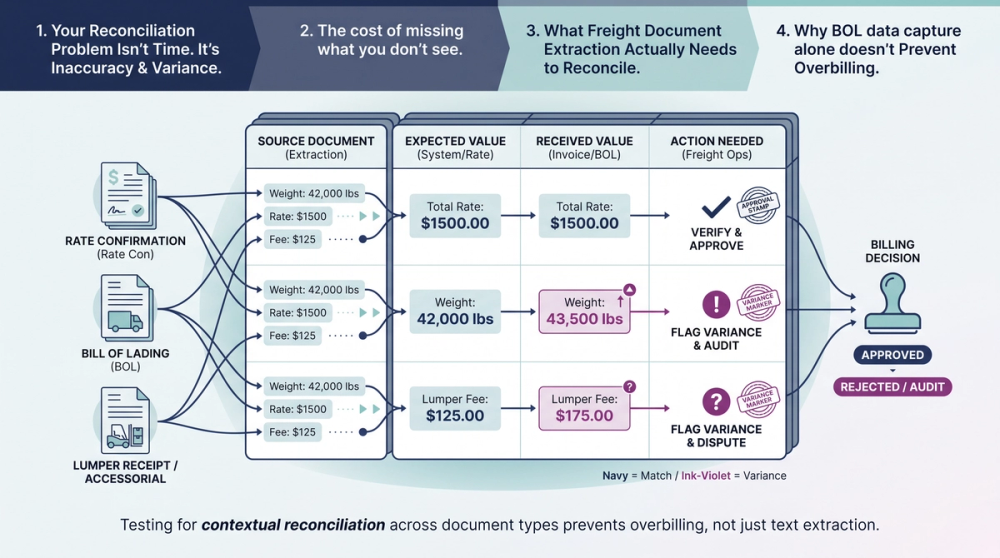
The same applies to lumper receipts. A lumper receipt shows $325. The carrier invoices $425 for lumper reimbursement. An extraction tool that captures both documents and compares those amounts flags the $100 delta in seconds. A manual review might never catch it, especially if the receipt is a grainy photo taken at a warehouse dock at 4 a.m. For more on where OCR accuracy breaks down on real freight documents, the failure points are predictable and worth understanding before you buy.
Rule-Based vs. AI Extraction: Which One Survives a Handwritten Lumper Receipt
This distinction matters more in freight than in almost any other industry. According to LlamaIndex's analysis of document extraction software evolution, modern AI-based extraction tools are specifically designed to handle nested tables, handwriting, and complex PDFs that brittle legacy OCR systems fail to process reliably. In freight, that's not a theoretical concern. It's Tuesday.
How rule-based extraction works (and where it breaks)
Rule-based (sometimes called template-based) extraction works by defining zones on a page. "The linehaul rate is always in row 3, column 2 of the rate con." This works fine if every carrier sends you the same PDF template. The moment a carrier uses a different format, moves a field, or sends a scanned image instead of a digital PDF, the rules break. Your team either gets bad data or no data.
For freight brokers handling 20 to 50 different carriers, each with their own invoice format, rule-based systems require constant maintenance. Every new carrier means a new template. Every format change means a support ticket.
How AI-based extraction handles freight chaos
AI-based extraction (using machine learning models trained on freight documents) doesn't rely on fixed zones. It identifies field types by context: "This number next to 'Total' and below a list of line items is probably the invoice total." It can read handwritten lumper receipts, parse carrier invoices with inconsistent formatting, and handle the low-quality scans that are standard in freight ops.
This doesn't mean AI extraction is perfect. It means it degrades gracefully. A rule-based system returns nothing (or worse, the wrong value) when a template doesn't match. An AI system may return a lower-confidence result that gets flagged for human review. That's the difference between missing a $300 detention overcharge and catching it.
A $100 lumper fee discrepancy on one load becomes $1,200 per year if it happens monthly and nobody catches it. The question isn't whether extraction software is worth it. It's whether the tool you choose can actually read the documents your carriers send.
The Five Features That Catch Overbilling Before You Pay the Invoice
Not every extraction feature matters equally for freight. If you're evaluating any document extraction tool for freight workflows, these five capabilities are what separate tools that save you money from tools that just save you keystrokes.
1. Line-item extraction from carrier invoices
The tool must pull each charge (linehaul, detention, lumper, fuel surcharge, accessorials) as a separate structured field. A single "total" extraction is useless for reconciliation. You need the breakdown to compare each line against the rate con.
Example: A fuel surcharge discrepancy. Your rate con locks FSC at 18%. The carrier invoices at 22%. On a $2,000 linehaul, that's an $80 overbill. If the extraction tool only captures the invoice total of $2,440 instead of breaking out the $440 FSC as a separate field, your team has to reverse-engineer the math. They won't. That $80 gets paid, and it repeats every week.
2. Cross-document field matching
Extraction from a single document is step one. The real value comes from matching fields across documents: rate con linehaul rate vs. invoice linehaul charge, lumper receipt amount vs. invoice lumper reimbursement, rate con FSC percentage vs. invoice FSC calculation. This is where carrier invoice scanning tools either earn their keep or fall short.
According to Truckstop.com's overview of AI improvements to freight broker workflows, document processing is one of four core everyday workflows where automation delivers measurable efficiency gains for brokers. But efficiency without accuracy is just faster mistakes. Cross-document matching is what turns speed into savings.
3. Timestamp and clause extraction from rate cons and PODs
Detention disputes are among the most common carrier billing conflicts. To dispute them effectively, you need the pickup/delivery window from the rate con and the actual arrival/departure timestamps from the POD. A good extraction tool captures these as structured, comparable values.
Example: A carrier charges a $250 TONU on a load where the POD timestamp shows the driver arrived 40 minutes late to the pickup window specified on the rate con. If your extraction tool captures both the rate con pickup window (0800 to 1000) and the POD arrival timestamp (1040), you have documented proof to dispute the TONU. Without structured extraction of both fields, you're digging through two separate PDFs trying to build the case manually.
4. Confidence scoring with human-in-the-loop routing
No extraction tool reads every document perfectly. The ones built for freight ops assign a confidence score to each extracted field. High-confidence fields get processed automatically. Low-confidence fields (that smudged lumper receipt, that handwritten BOL) get routed to a person for verification. This prevents bad data from entering your TMS while keeping the process moving for clean documents.
5. TMS integration that writes structured data, not just PDFs
An extraction tool that outputs data into a CSV or JSON but can't push it into your TMS load records still leaves a manual step. The tool should write extracted fields directly into the corresponding TMS fields: linehaul rate, accessorial charges, reference numbers, weights. This is what eliminates the double data entry problem that costs freight ops teams hours every week. According to Aljex's overview of EDI in freight and trucking, structured electronic data exchange has long been the standard for reducing manual entry errors. Modern extraction tools should deliver the same structured output, even when the source document is an unstructured PDF or image.
Laneproof's extraction engine is built around these five capabilities, pulling line-item charges from carrier invoices, matching them against rate con fields, and flagging variances before payment goes out. If a lumper receipt says $325 and the invoice says $425, the $100 delta surfaces automatically.
How to Test Any Extraction Tool Against Your Own Freight Documents
You've probably heard vendors promise 99% accuracy on document extraction. Here's the difference between a demo and reality: demo documents are clean, formatted, high-resolution PDFs. Your documents are not. According to an empirical test of nine document extraction tools against 50 real logistics documents including bills of lading from seven major carriers, accuracy varies significantly depending on document type, formatting, and image quality. That's why you need to test with your own documents before committing.
Here's a step-by-step testing protocol for any freight document extraction tool:
Step 1: Assemble a test set of 20 to 30 real documents
Pull documents from your actual operations. Include:
- 5 to 8 carrier invoices from different carriers (different formats)
- 5 to 8 rate confirmations (include at least 2 with accessorial clauses)
- 3 to 5 BOLs (include at least 1 with handwritten entries)
- 3 to 5 PODs (include at least 1 low-quality scan)
- 2 to 3 lumper receipts (include at least 1 photo from a phone camera)
Step 2: Define your expected output for each document
Before you run the test, manually identify the key fields from each document. For a carrier invoice, that means: linehaul charge, each accessorial charge separately, FSC amount or percentage, total, and invoice number. For a rate con: linehaul rate, FSC terms, detention/layover clauses, pickup/delivery windows. This gives you a ground truth to compare against.
Step 3: Run the extraction and score field-level accuracy
Don't just check if the tool "got it right." Score each field individually. Did it extract the linehaul rate correctly? Did it capture the FSC percentage or just the FSC dollar amount? Did it read the detention clause or skip it? Did it capture the lumper receipt total from a grainy photo? A tool that gets 95% of fields right on clean PDFs but drops to 60% on scanned lumper receipts is a tool that will miss the exact overcharges you're trying to catch.
Step 4: Test cross-document matching
Feed the tool a rate con and its corresponding carrier invoice. Does it automatically compare the linehaul rate? Does it flag if the invoice includes a detention charge that the rate con doesn't authorize? Does it compare FSC percentages? This is the test that separates OCR tools from freight reconciliation tools.
Step 5: Check the TMS integration
Run 5 to 10 documents through the full pipeline: extraction, matching, and data push to your TMS. Verify that the fields land in the right places. A linehaul rate should populate the linehaul field, not a notes field. An invoice number should link to the correct load. If the integration is sloppy, you're trading manual entry for manual correction, which is worse because now you trust the data less.
Real Scenarios: Where Extraction Catches What Manual Review Misses

The dollar amounts below are based on common freight billing patterns. Here's how extraction software performs in three scenarios that ops teams deal with regularly.
Scenario 1: The lumper receipt vs. the carrier invoice
A lumper receipt from a distribution center shows $325 for unloading services. The carrier submits an invoice that includes $425 for lumper reimbursement. The carrier either made a clerical error or padded the charge by $100.
With manual reconciliation, the billing coordinator would need to locate the lumper receipt (often a photo buried in an email thread), compare it to the invoice line item, and calculate the difference. Across 80 invoices a week, this check gets skipped more often than not.
With extraction software that captures both documents: the tool reads $325 from the receipt, reads $425 from the invoice lumper line, and flags the $100 variance automatically. Time to catch: seconds. Money saved on this single load: $100. If this carrier does it on 12 loads a year, that's $1,200 recovered.
Scenario 2: Fuel surcharge math that doesn't match the rate con
The rate con specifies an FSC of 18% applied to the linehaul rate. The linehaul is $2,000. The correct FSC is $360. The carrier invoices FSC at 22%, which comes to $440. The difference: $80.
This is exactly the type of overcharge that manual reconciliation misses consistently. The billing coordinator sees a total that looks "about right" and approves it. An extraction tool that pulls the FSC percentage from the rate con, pulls the FSC amount from the invoice, and calculates whether they match catches this automatically. Over 50 loads a month from this carrier at the same discrepancy rate, that's $4,000 per month.
Scenario 3: Detention charged on a load with no detention clause
The rate con shows a linehaul rate of $2,150 with no mention of detention, layover, or waiting time provisions. The carrier invoices $2,150 plus $300 for 2 hours of detention at delivery.
A tool with cross-document matching reads the rate con, confirms there is no detention clause, reads the $300 detention charge on the invoice, and flags it as unauthorized. The ops manager disputes the charge with documentation already assembled. Without extraction, this requires someone to open the rate con PDF, read through the terms, compare them to the invoice, and build the dispute manually. That's 10 to 15 minutes per instance, if it gets reviewed at all.
A freight broker running 200 loads per month who implements automated invoice-to-rate-con matching can expect to recover an average of $1,100 to $2,400 per month based on documented overbilling catch rates across the scenarios above. That's $13,200 to $28,800 per year for a mid-size brokerage.
Laneproof runs exactly these comparisons across every load, matching rate con terms, lumper receipts, and POD timestamps against carrier invoice line items to surface discrepancies before payment. If you want to test it against your own documents, start with the extraction tool and a batch of your messiest carrier invoices.
Frequently Asked Questions About Freight Document Extraction Software
Can freight OCR tools read handwritten BOLs and lumper receipts?
AI-based extraction tools can read handwritten text with reasonable accuracy, though results vary by handwriting legibility and image quality. According to LlamaIndex's analysis of modern extraction software, AI models are specifically designed to handle handwriting and complex layouts that rule-based OCR systems fail on. The key is testing with your actual documents: grab your worst lumper receipt photo and run it through the tool before you buy.
How long does it take to integrate a document extraction tool with my TMS?
Integration timelines depend on the TMS. API-based integrations with modern TMS platforms typically take days to a few weeks. Legacy systems that rely on flat-file imports or manual uploads take longer. The critical question during evaluation isn't "how fast can we integrate" but "does the extracted data land in the right fields." A fast integration that puts linehaul rates in the wrong column creates more problems than it solves.
What's the difference between carrier invoice scanning and invoice reconciliation?
Carrier invoice scanning (extraction) reads the data off the invoice and turns it into structured fields. Invoice reconciliation compares those fields against other documents (rate cons, BOLs, lumper receipts) to find discrepancies. Many tools do extraction but stop short of reconciliation. For freight ops, extraction without matching is only half the job. You need both to catch overbilling.
Do I need a separate extraction tool if my TMS already has OCR built in?
Most TMS platforms with built-in OCR handle basic field extraction from clean, formatted documents. They typically struggle with multi-format carrier invoices, handwritten documents, and the kind of cross-document matching that catches accessorial overbilling. If your TMS OCR misses line-item charges or can't compare rate con clauses against invoice entries, a dedicated extraction tool fills that gap.
How much does freight document extraction software typically cost?
Pricing models vary widely: per-document, per-user, or flat monthly tiers. For a broker handling 200 to 500 loads per month, expect $200 to $1,000 per month depending on the tool and feature set. The ROI calculation is straightforward: if the tool catches $1,100 to $2,400 per month in overbilling (as documented in the scenarios above), it pays for itself in the first month. The question is whether the tool's accuracy on your documents justifies the cost, which is why the testing protocol in this article matters.
Sources
- Best Logistics Document Extraction Tools in 2026: 9 Tested — ImageToTable.ai
- Top Document Extraction Software: From Legacy OCR to Modern AI — LlamaIndex
- AI Solutions for Automating Document Collection in Freight Brokerage — LunaPath
- 4 Everyday Freight Workflows AI Improves for Brokers — Truckstop.com
- Best AI Tools for Freight Forwarders in 2026 — Mirage Metrics
- EDI For Freight & Trucking: Everything You Need to Know — Descartes Aljex
Stop Paying for Overcharges You Can't See
The best document extraction tool for freight isn't the one with the highest claimed accuracy rate on a vendor's website. It's the one that reads your carrier invoices, your rate cons, and your lumper receipts accurately enough to flag the overbills hiding in your payables right now. Test with your own documents. Score field-level accuracy, not just totals. And prioritize cross-document matching over raw extraction speed.
If you want to see how automated extraction and matching works against real freight billing discrepancies, run your documents through Laneproof's extraction tool and check the results against the five-feature framework above. The math either works or it doesn't, and you'll know within your first batch.