Data Extraction in Freight: Stop Retyping BOLs and Losing Money
Researched and written with AI assistance. Reviewed by the Laneproof team.

A dispatcher keys a rate confirmation into your TMS. It takes about 6 minutes. Across 500 loads per month, that adds up to 50 hours of labor, roughly $900 in wages alone, spent on retyping information that already exists on a document someone else created. Now add the billing errors. A lumper fee of $185 gets entered as $815 because of one transposed digit. A fuel surcharge comes through at 12.5% when the rate con says 11.2%. A TONU charge shows up on a carrier invoice with no matching cancellation in the system. These aren't hypothetical problems. They're the daily reality of data extraction done by hand in freight operations. And every one of them costs real money.
According to the American Trucking Associations' economics and industry data, trucks moved approximately 72.7% of the nation's freight by weight in 2024. That volume means millions of BOLs, rate cons, PODs, and carrier invoices flowing through small and mid-size brokerages every week. Most of those documents are still being retyped into a TMS by hand. This article shows you exactly where that process breaks down, what it costs per load, what automated data extraction actually fixes, and what it still can't do.
What Data Extraction Actually Means in a Freight Operation
Data extraction is the process of collecting or retrieving data from a variety of sources, many of which may be poorly organized or completely unstructured. That's the definition from Talend, a widely cited data integration resource. In freight, this means pulling specific fields (shipper name, consignee address, weight, rate, accessorial charges, reference numbers) out of documents like BOLs, rate confirmations, carrier invoices, and PODs, then getting that information into your TMS or accounting system in a usable format.
Two Types of Data Extraction That Matter in Freight
There are two broad types of data extraction relevant to freight ops:
- Structured extraction pulls data from documents that follow a consistent template. Think EDI transmissions or standardized carrier invoices where every field lands in the same spot. These are easier to automate because the system knows where to look.
- Unstructured extraction deals with documents that vary in layout, formatting, and field placement. This describes most BOLs, rate cons, and carrier invoices in the real world. Every carrier has a slightly different PDF template. Some are scanned images. Some are email attachments with handwritten notes.
The hard part in freight isn't extracting data from clean, standardized formats. It's handling the messy ones. A rate con from a small carrier looks nothing like one from a major fleet. A BOL with handwritten weight corrections doesn't match the clean digital version in your TMS. This is where OCR (optical character recognition) technology comes in. OCR reads text from images and PDFs, converting scanned or photographed documents into machine-readable data. But as we'll cover later, OCR alone doesn't solve the problem.
Why This Isn't Just an IT Problem
Data extraction in freight isn't a back-office technology project. It directly affects billing accuracy, carrier payment timelines, dispute resolution speed, and margin protection. When a billing coordinator can't quickly compare the rate on a carrier invoice to the original rate con because the data lives in two different formats (or worse, one is a scanned PDF and the other is a TMS entry), that's a data extraction failure with real financial consequences.
Where Your Team Is Manually Re-Entering Data Right Now (And What It Costs)
If you run a freight brokerage or carrier operation with 100 to 5,000 loads per month, your team is almost certainly retyping data from documents into your TMS at multiple points in the load lifecycle. Here's where it happens and what it costs.
Rate Con Entry
Every time a load is booked, someone keys the rate confirmation details into the TMS: carrier name, MC number, rate, fuel surcharge percentage, accessorial terms, pickup and delivery addresses, appointment times, and reference numbers. A typical rate con has 15 to 25 fields that need to be entered.
Example: At an average of 6 minutes per rate con, a team processing 500 loads per month spends 50 hours on rate con data entry alone. At $18 per hour, that's $900 per month, or $10,800 per year, just on this single task. That's a full-time employee spending more than a week each month doing nothing but retyping information from one document into another system.
BOL and POD Processing
After delivery, BOLs and PODs come back (often as photos, faxes, or scanned PDFs) and need to be matched to the load in the TMS. Fields like actual weight, piece count, delivery time, and receiver signatures need to be verified or entered. Many of these documents arrive in poor quality, with handwritten notes, stamps, or partial scans.
Manual BOL data entry carries an error rate of approximately 1 in every 300 keystrokes. A BOL with 40 fields, each averaging 8 to 10 keystrokes, means roughly 320 to 400 keystrokes per document. Statistically, that puts at least one error on nearly every BOL processed by hand. Not every error causes a billing problem. But enough of them do.
Carrier Invoice Reconciliation
This is where the real money hides. A carrier sends an invoice. Someone on your team compares it to the rate con and the BOL, checking the linehaul rate, fuel surcharge, detention charges, lumper fees, and any other accessorials. If anything doesn't match, they need to flag it, document the discrepancy, and initiate a dispute.
The problem: doing this manually requires pulling up two or three documents, reading them side by side, and catching differences that might be as small as a percentage point on a fuel surcharge. Per Transport Topics reporting on freight data management, freight brokers are increasingly adopting automated data collection tools and natural language processing to manage growing data volumes, precisely because manual comparison doesn't scale.
How Typos and Missed Fields on BOLs and Rate Cons Turn Into Real Billing Disputes
A data entry error isn't just an inconvenience. In freight, it becomes a billing dispute, a delayed payment, a margin hit, or all three. Here are specific scenarios that happen routinely in freight ops.
Scenario: The Transposed Lumper Fee
A lumper fee of $185 gets entered into the TMS as $815 due to a transposed digit during manual keying. The carrier submits an invoice for $185. Your system shows $815. The discrepancy triggers a dispute. Payment is delayed by 11 days while both sides pull up the original BOL and rate con to verify the correct amount. The carrier is frustrated. Your team spent time resolving a problem that shouldn't have existed. And the $630 difference sat in limbo, distorting your payables reporting for nearly two weeks.
Scenario: The Fuel Surcharge Mismatch
A carrier invoice shows a fuel surcharge of 12.5%. The rate con clearly states 11.2%. On a $2,200 load, the linehaul portion subject to fuel surcharge might be $1,800. That's a difference of $23.40 per load. Multiply that across 240 loads per month with the same carrier, and you're looking at $5,616 in annual overbilling from a single percentage point discrepancy that's invisible unless someone reads both documents carefully, every single time.
Even at a more conservative calculation of $28 per load (depending on how the surcharge is structured), that compounds to $3,360 per month on 240 loads. Either way, it's real money leaving your operation because of a field that was manually read or entered incorrectly.
Scenario: The Ghost TONU Charge
A TONU (truck order not used) charge of $350 appears on a carrier invoice. Your TMS shows no load cancellation record for that date or lane. Without cross-referencing the original rate con and BOL, your billing coordinator has no way to verify whether the cancellation happened, who authorized it, or whether the TONU fee was even part of the agreed terms. This is a freight invoice dispute that can only be resolved by pulling source documents, and if those documents weren't properly digitized and indexed, it might take 30 minutes or more to track down the answer.
Scenario: The Detention Charge That Doesn't Match Free Time Terms
A billing coordinator catches a $175 detention charge on a carrier invoice. The rate con specifies a 2-hour free time window. The BOL shows the driver arrived at 8:15 AM and departed at 10:00 AM, well within the 2-hour window. But the carrier's invoice lists arrival at 7:45 AM and departure at 10:30 AM, claiming 2 hours and 45 minutes on site. This discrepancy is only visible by comparing two documents side by side, and it requires reading timestamps from source documents, not just checking what's in the TMS.
A single transposed digit on a lumper fee turned $185 into $815 and delayed carrier payment by 11 days. That's not a technology problem. It's a data extraction problem.
What Automated Data Extraction Fixes — and What It Doesn't
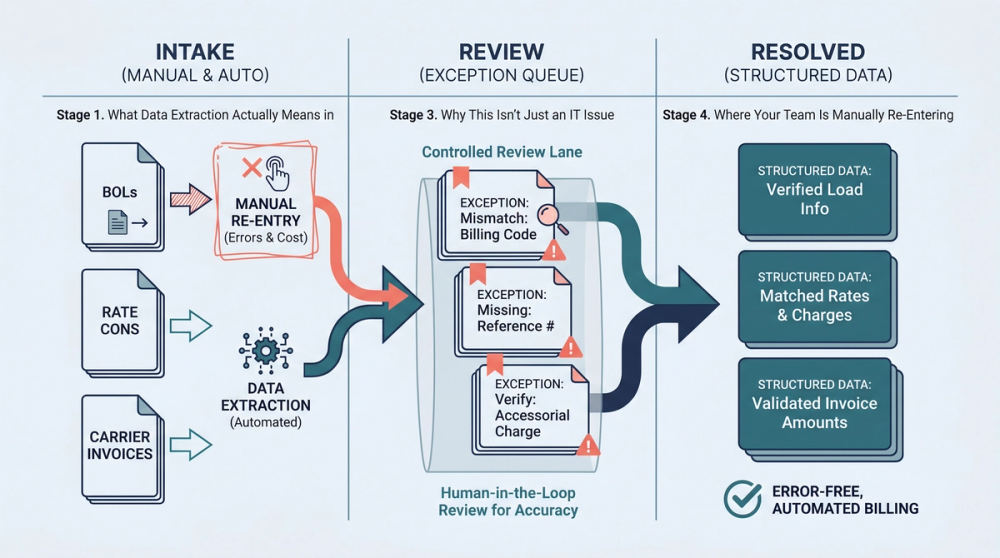
You've probably heard this before: "Automate your document processing and save hours." Here's the honest version of what automated data extraction actually does in a freight workflow, and where it still falls short.
What It Fixes
- Eliminates retyping. Automated extraction reads fields from rate cons, BOLs, PODs, and carrier invoices and populates your TMS directly. That 50-hour monthly labor cost for rate con entry? It drops to review and exception handling, which typically takes 20% of the original time.
- Catches field-level discrepancies. When extraction pulls data from both the carrier invoice and the rate con, automated matching can flag mismatches on rate, fuel surcharge percentage, detention terms, and accessorial charges before anyone approves payment.
- Creates an audit trail. Every extracted field is tied back to the source document. When a carrier disputes a charge, you can pull the original rate con and BOL data in seconds, not minutes or hours.
- Reduces keystroke errors. The 1-in-300 keystroke error rate on manual entry goes away for fields that are extracted automatically. Machines don't transpose digits because they're tired at 4 PM on a Friday.
According to Artsyl Technologies' guide on automated data extraction for freight management, automated extraction tools can process freight documents with high accuracy across varying layouts, reducing both processing time and error rates. Truckstop's analysis of AI in freight broker workflows specifically highlights AI document readers that extract fields from PDFs and images as a best practice, reducing manual data entry and improving compliance tracking.
What It Doesn't Fix
No extraction tool is perfect, and overselling this technology is a disservice to the people who actually use it. Here's where automation still struggles:
- Handwritten documents. OCR accuracy drops significantly on handwritten BOLs, especially those with poor penmanship, smudges, or overlapping text. If a driver scrawls a weight correction on a BOL, most extraction tools will either miss it or misread it.
- Non-standard layouts. While modern extraction tools handle many carrier invoice formats, a completely new layout (from a carrier your team hasn't worked with before) may require manual review on the first pass. The system learns, but it doesn't start perfect.
- Judgment calls. Automated extraction can flag that a detention charge doesn't match the rate con terms. It can't decide whether to pay it, dispute it, or split the difference. That still requires a human who understands the carrier relationship and the operational context.
- Garbage-in documents. If a scanned BOL is blurry, cropped, or missing a page, extraction can't invent the data. Low-quality source documents are the biggest single limitation of any automated system.
Being honest about these limitations matters. If someone sells you a tool and claims 100% accuracy on every document, walk away. The realistic goal is to automate 80% to 90% of routine document processing and flag the rest for human review. That still saves enormous time and catches errors that manual processes miss.
How to Set Up a Document Extraction Workflow Without an IT Department
Most freight brokerages with 5 to 50 employees don't have a dedicated IT team. That doesn't mean automated data extraction is out of reach. Here's a practical workflow you can set up without writing code or hiring a developer.
Step 1: Identify Your Highest-Volume Document Types
Start with the documents your team touches most. For most brokerages, that's rate confirmations and carrier invoices. These two document types drive the majority of TMS data entry and are the primary source of billing discrepancies. BOLs and PODs come next, especially if your team is manually verifying delivery details.
Step 2: Centralize Document Intake
Before you can extract data from documents, you need them in one place. Set up a dedicated email address or folder where all carrier documents land. Many brokerages already have this, but the documents often sit in individual inboxes or get forwarded inconsistently. A single intake point (such as docs@yourcompany.com or a shared drive folder) ensures nothing gets missed.
Step 3: Choose an Extraction Tool That Connects to Your TMS
The extraction tool needs to do two things: read the document accurately and send the data somewhere useful. That "somewhere useful" is almost always your TMS. Look for tools that offer direct integration with your TMS platform, or at minimum, export to a format (CSV, API) that your TMS can import. If the tool can extract data but can't get it into your system without manual steps, you've just moved the bottleneck instead of removing it.
As DAT notes in their analysis of data in freight brokerage, market data and operational data are only valuable when they're accessible and actionable within the systems your team already uses.
Step 4: Start With Review Mode, Not Auto-Approve
Don't flip the switch to full automation on day one. Start by running extracted data through a review queue where your billing coordinator or ops manager can compare the extracted fields to the source document. This builds confidence in the tool's accuracy and lets you catch any systematic misreads before they become billing problems. After two to four weeks of consistent accuracy, you can start auto-approving high-confidence extractions and only routing exceptions for manual review.
Step 5: Measure What Changes
Track three metrics before and after implementation:
- Time per document. How many minutes does it take to get a rate con or carrier invoice into the TMS? This should drop by 60% to 80%.
- Dispute rate. How many carrier invoices per month trigger a billing dispute? This should decrease as extraction catches mismatches earlier.
- Error count. How many data entry corrections does your team make per week? This is your baseline for measuring accuracy improvement.

The Overbilling Math Your Team Should Run Today
Before investing in any tool, run the numbers on what manual freight document processing is actually costing your operation. Here are three calculations you can do with data you already have.
Example: Labor Cost of Manual Rate Con Entry
Count the number of loads your team books per month. Multiply by 6 minutes (the average time to key a rate con into a TMS). Divide by 60 to get hours. Multiply by your fully loaded hourly labor rate.
For a brokerage handling 500 loads per month: 500 × 6 minutes = 3,000 minutes = 50 hours. At $18/hour, that's $900 per month or $10,800 per year on rate con entry alone. At $22/hour (including benefits and overhead), it's $13,200 per year.
Example: Accessorial Overbilling Exposure
Based on Laneproof analysis of carrier invoice data, carriers overbill on accessorials in an estimated 3.8% of invoices. For a broker moving 300 loads per month at an average freight invoice amount of $2,200, the math works out as follows:
- 300 loads × 3.8% = 11.4 invoices per month with accessorial overbilling
- Average overbilling per affected invoice: $185 (covering detention, lumper, and fuel surcharge discrepancies)
- Monthly exposure: 11.4 × $185 = $2,109
- Annual exposure: approximately $25,000
That $25,000 isn't a guarantee of recovery, but it represents the invoices your team should be catching and isn't, because manual comparison of every carrier invoice against every rate con doesn't scale.
Example: Fuel Surcharge Drift
Pull 20 carrier invoices at random. Compare the fuel surcharge percentage on each invoice to the percentage on the corresponding rate con. If even 10% show a mismatch of 1 percentage point or more, multiply the average dollar difference by your monthly load count. Based on Laneproof analysis of invoice documents, a $28 per-load difference on fuel surcharges, applied across 240 loads per month, compounds to $3,360 monthly or $40,320 annually. The discrepancy is small enough that manual review often misses it but large enough to materially affect margins.
Frequently Asked Questions About Data Extraction in Freight
What do you mean by data extraction?
Data extraction is the process of pulling specific pieces of information from documents or data sources and converting them into a structured, usable format. In freight, this means reading fields like rates, weights, reference numbers, and accessorial charges from BOLs, rate cons, and carrier invoices, then putting that data into your TMS or accounting system. According to Talend's definition, the sources are often poorly organized or completely unstructured, which describes most freight documents accurately.
Is data extraction a skill, or do I need special software?
Both. Your billing coordinators and dispatchers already perform data extraction every day when they read a rate con and type the information into a TMS. That's manual data extraction, and it's a real skill that requires attention to detail. Automated data extraction uses OCR and machine learning to do the same thing faster and with fewer errors. You don't need coding skills to use modern extraction tools, but you do need someone on your team who understands the documents well enough to review exceptions and catch edge cases the software misses.
What is data extraction used for in freight specifically?
In freight operations, data extraction is used for invoice data capture (pulling charges from carrier invoices into your billing system), BOL data entry (reading shipment details from bills of lading), rate con processing (entering booked rates and terms into your TMS), and document matching (comparing fields across multiple documents to catch discrepancies). The end goal is faster invoicing, fewer billing disputes, and better margin protection.
What are two types of data extraction relevant to freight?
The two types are structured and unstructured extraction. Structured extraction works with documents that follow a consistent format, like EDI files or standardized carrier invoice templates. Unstructured extraction handles documents that vary in layout, such as BOLs from different shippers or rate cons from different carriers. Most freight operations deal primarily with unstructured documents, which is why basic OCR alone often isn't enough. You need extraction tools that can adapt to varying document formats.
How accurate is automated data extraction on freight documents?
Accuracy varies by document quality and format consistency. On clean, digital PDFs from carriers with standardized templates, modern extraction tools typically achieve 92% to 98% field-level accuracy. On scanned documents, handwritten BOLs, or low-resolution photos, accuracy drops to 70% to 85%, requiring more manual review. The practical approach is to auto-approve high-confidence extractions and route low-confidence ones for human verification. This hybrid model captures most of the time savings while maintaining billing accuracy.
Sources
- Economics and Industry Data — American Trucking Associations
- For Freight Brokers, Managing Data Key as Volume Grows — Transport Topics
- What is Data Extraction? Definition and Examples — Talend
- Automated Data Extraction for Freight Management — Artsyl Technologies
- 4 Everyday Freight Workflows AI Improves for Brokers — Truckstop.com
- Unleash the Power of Data in Your Freight Brokerage Journey — DAT
Stop Retyping. Start Catching What You're Missing.
Manual data entry from BOLs, rate cons, and carrier invoices isn't just slow. It's where billing errors are born, where accessorial overbilling hides, and where your team spends hours doing work that a well-configured extraction tool handles in seconds. The numbers are clear: $10,800 per year in rate con entry labor, $25,000 in annual overbilling exposure on accessorials, and thousands more in fuel surcharge drift that's too small to notice on any single load but too large to ignore across a month.
The fix isn't magic. It's identifying your highest-volume document types, centralizing intake, and implementing extraction with a review period before full automation. Ask hard questions of any vendor: What's the accuracy on handwritten documents? Does it integrate with my TMS? Can I see the source document alongside the extracted data? Those questions protect you from tools that demo well but don't survive contact with real freight documents.
If your team processes more than 50 invoices a week, automated document data extraction tools can catch the discrepancies covered in this guide, from transposed lumper fees to fuel surcharge mismatches, before they become disputes. That's not a promise to fix everything. It's a realistic path to spending less time retyping and more time protecting your margins.
Full guide: Document Automation for Freight Ops: Stop Entering BOL Data by Hand
Related: Document Processing for Freight Brokers: Where BOL Errors Cost You
Related: Freight OCR: What It Reads Accurately and Where It Breaks Down