Freight Broker Software With Automated Document OCR: Where It Fails
Researched and written with AI assistance. Reviewed by the Laneproof team.
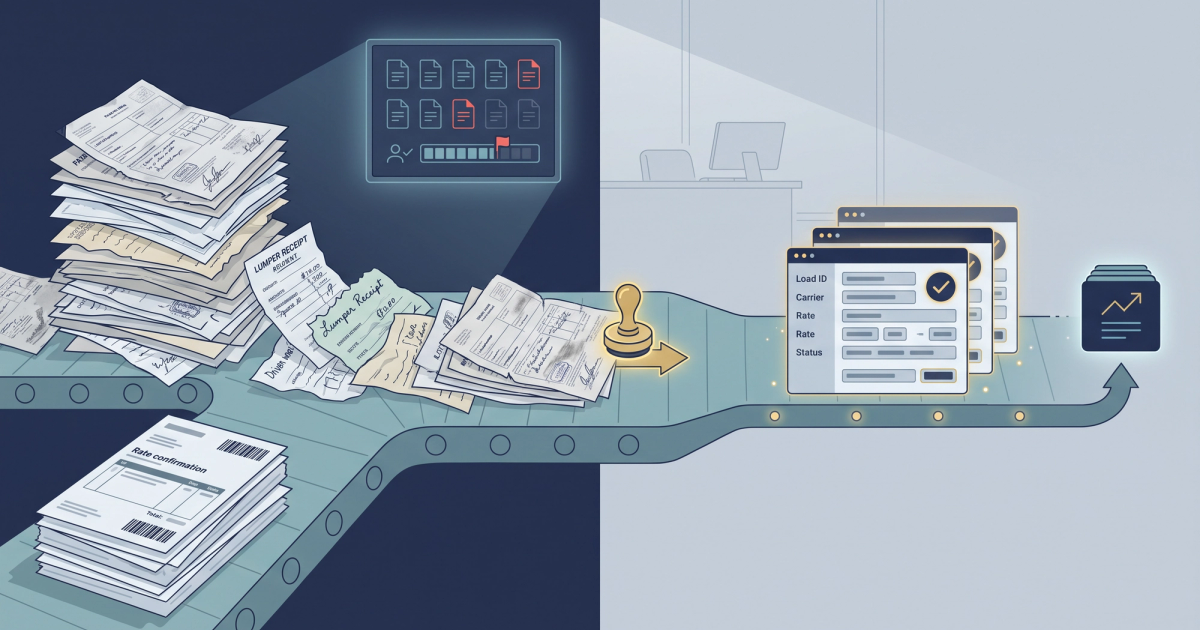
A billing coordinator handling 150 loads a month spends roughly 6.5 hours a week keying carrier packets: rate con numbers, BOL details, POD dates, lumper receipts, detention start and stop times. Add the dispatcher who re-types pickup numbers into the TMS and you are near 10 hours a week of pure transcription. At a $28 fully loaded hourly rate, that is about $1,212 a month in labor doing work no customer pays you for.
Freight broker software with automated document OCR is sold as the cure. Sometimes it is. But OCR accuracy is not one number, and vendors quote you the best one. Typed rate confirmations scan almost perfectly. A faxed BOL with a fuel stain and a handwritten detention note does not. This article breaks down which documents OCR handles cleanly, which ones will still land in your exception queue every week, and how to run the hours-saved math before you put a card down.
Your Bottleneck Is Keying the Packet, Not Reading It
Ask any ops manager where the day goes and you will not hear "reading documents." You will hear "getting documents into the system." The reading takes four seconds. The typing, tabbing, correcting, and re-saving takes four minutes per document, and a single load can carry six to eight documents: rate con, BOL, POD, lumper receipt, scale ticket, detention log, carrier invoice, and whatever the shipper emailed at 11pm.
The core functions of a modern brokerage stack (load management, carrier onboarding, document handling, invoicing, and settlement) are all described in Descartes' breakdown of freight broker software. Notice what those functions have in common: every one of them starts with data that arrives as a document. The TMS does not create the rate con. It receives it. Somebody has to turn that PDF into fields.
That is the actual bottleneck. Not the software's ability to store documents. The gap between a PDF landing in a shared inbox and the numbers from that PDF sitting correctly in load, carrier, and invoice records. Brokers running 100 to 500 loads a month usually solve this with a person. Brokers running 2,000 loads a month cannot, which is why document automation stops being optional somewhere around the 400-load mark.
The trap: when you shop for OCR, you are shown a demo with a clean, typed, digitally generated rate confirmation. That document is the easiest input in the entire freight document ecosystem. Your exception queue will not be built from those.
Where OCR Actually Breaks: Rate Cons vs BOLs vs Lumper Receipts
OCR works by converting scanned or image-based documents into machine-readable text, then applying field-level logic to pull specific values out of that text. Artsyl's explanation of automated data extraction for freight management walks through the mechanics. The key point buried in every technical description of OCR: extraction quality depends on input quality and layout consistency. Freight documents vary wildly on both.
Rate confirmations: the easy tier
A rate con generated by a TMS and emailed as a native PDF is structured text, not an image. There is nothing to "recognize." The system reads the text layer directly. Load number, origin, destination, pickup and delivery appointments, linehaul rate, fuel surcharge, accessorial terms, and carrier MC number all sit in predictable positions per broker template.
Once the engine has seen twenty rate cons from the same brokerage, extraction on that template is close to deterministic. This is the tier where automation pays immediately and where automated document generation also helps: ARK TMS describes generating rate confirmations, BOLs and invoices from one data set so the same fields are not keyed three times.
Bills of lading: the messy middle
A BOL might arrive as a clean carrier-generated PDF or as a photo taken in a dark dock by a driver holding the paper at an angle. Same document type, completely different input. Signature blocks, shipper stamps, pallet counts written in pen, exception notes scrawled in the margin, and "3 pcs damaged" written across the piece count field all degrade extraction.
The fields that break most often are exactly the ones that cost money: piece count, weight, seal number, and the arrival and departure times used to prove detention. If your engine reads a delivery time of 14:30 as 4:30, your detention claim math is wrong before anyone looks at it. We covered this failure pattern in depth in where BOL errors cost brokers real money.
Lumper receipts and handwritten accessorial docs: the hard tier
A lumper receipt is often a thermal-printed slip, a carbon copy, or a handwritten note with a dollar amount and a signature. Thermal paper fades. Carbon copies smear. Handwriting is handwriting. This is the document class where general-purpose OCR falls apart and where a misread digit turns into a real dispute, because the amount on the receipt is the amount the carrier bills back to you.
OCR accuracy is a per-document-type number, not a single vendor percentage. Ask for it broken out by rate con, typed BOL, scanned BOL, and handwritten receipt, or you are not getting an answer.
Why Your TMS Data Entry Bottleneck Isn't Really About OCR Speed
Every OCR vendor will tell you they process a document in under three seconds. Nobody's back office is slow because a computer took four seconds instead of two. The bottleneck lives in the three steps around extraction.
Step one: getting documents into the pipeline
If your carriers email PODs to five different inboxes, drivers text photos to dispatchers, and shippers use a portal that requires a manual download, the OCR engine never sees half your documents on time. Intake routing matters more than recognition quality. Broker back-office automation platforms like Transflo's Workflow AI for brokers put weight on capture channels for exactly this reason: a document that arrives in a place the system does not watch is a document your team handles by hand.
Step two: writing extracted fields into the right records
Extraction without write-back is a demo, not a workflow. If OCR pulls 14 fields off a rate con and then a human copies those 14 fields into your TMS, you saved reading time and nothing else. The integration question (does this write directly into McLeod, Turvo, Tai, Aljex, AscendTMS, or whatever you run, and into QuickBooks or your accounting system) determines whether you save 20% of the time or 70% of it.
This is the single most under-asked question in OCR demos. Ask whether write-back is native, API-based, or a CSV export somebody uploads. A CSV export is not automation. It is a shorter typing job.
Step three: the exception queue
Every OCR system produces exceptions. The question is not whether you get them. It is whether the exception workflow takes 15 seconds or 3 minutes per document. A good exception screen shows the document image side by side with the extracted field, highlights the low-confidence value, and lets you correct with one keystroke and move on. A bad one makes you open the PDF in another tab and retype the whole record.
That difference is the whole ROI. Same accuracy rate, wildly different hours saved. If you are mapping out a broader automation plan, we walked through sequencing this without wrecking your existing setup in how to automate freight brokerage operations.
The Real Accuracy Numbers Vendors Don't Put on Their Website
Here is how to read accuracy claims. A vendor saying "99% accuracy" almost always means character-level accuracy on clean input. Character accuracy of 99% on a 40-character address line means you get a wrong character roughly every 2.5 lines. That is not the same as field accuracy, and field accuracy is not the same as document accuracy.
Three different measurements you should force a vendor to separate:
- Character accuracy: percentage of individual characters read correctly. Highest number, least useful.
- Field accuracy: percentage of extracted fields that are exactly correct. This is what determines rework.
- Straight-through rate: percentage of documents that require zero human touch. This is the only number that maps to hours saved.
A realistic accuracy profile by document type
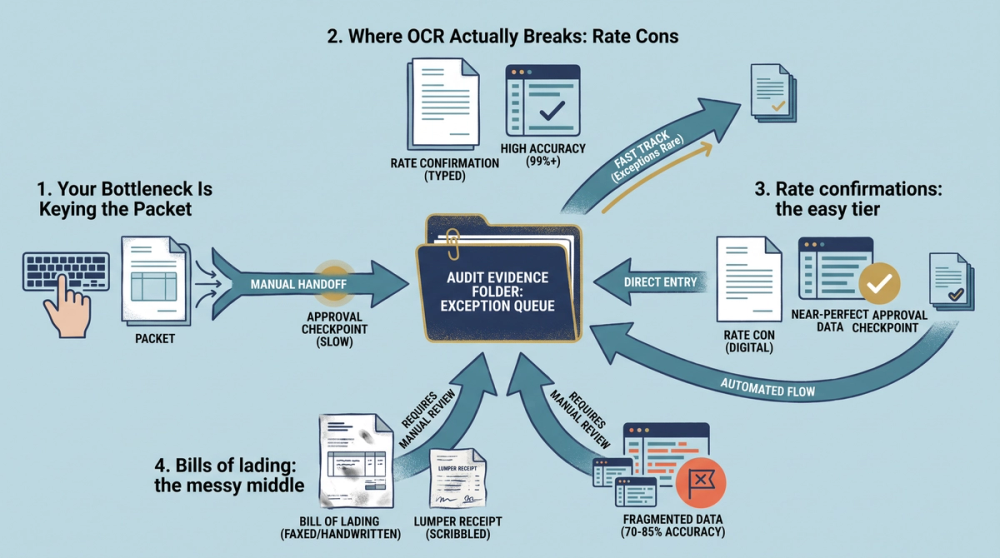
The figures below are illustrative planning numbers, not published benchmarks. Use them to structure your own pilot test, then replace them with results from your actual document mix. A pilot on 200 of your own documents will tell you more than any vendor deck.
- Native PDF rate cons: expect field accuracy in the mid to high 90s. Straight-through rates here should be your best.
- Carrier-generated typed BOLs: solid but lower, because layouts vary by carrier and stamps overlap fields.
- Scanned or faxed BOLs and driver phone photos: meaningfully worse. This is where a 96-98% typed-document engine lands closer to 78-85% field accuracy in a broker's real mix.
- Handwritten lumper receipts and detention logs: lowest tier. Plan on human review as the default, not the exception.
The fields that get misread most
In freight specifically, the highest-risk extraction fields are time stamps and accessorial codes. Detention arrival and departure times get misread because they are often handwritten or stamped over text. TONU is a frequent problem because it may appear as "TONU," "Truck Order Not Used," or as a line item with no label at all, and an engine that has not been trained on freight vocabulary will classify it as generic "other charges."
That distinction matters for disputes. A charge coded as "other" does not automatically check against the rate con's accessorial terms. A charge coded as TONU does. This is exactly why freight-specific extraction beats generic document OCR, a point made in Lanesurf's overview of freight broker software with automated document OCR: the model has to know what a lumper fee is, not just how to read the characters.
What Happens When OCR Gets a Field Wrong
This is the section vendors skip. Errors are not evenly costly. A misread carrier contact name costs you nothing. A misread accessorial amount costs you the difference, and you pay it because nobody caught it.
Confidence scoring and thresholds
A usable system attaches a confidence score to each extracted field and routes anything below your threshold to review. The threshold should be different by field. Set it low for a reference number that gets validated against the load record anyway. Set it high for anything with a dollar sign attached. If your software cannot set field-level thresholds, you are stuck choosing between too many exceptions and too many silent errors.
Cross-checks beat confidence scores
The stronger control is validation against a known-good record. Extracted linehaul should match rate con linehaul. Extracted fuel surcharge should match the agreed calculation. Detention hours claimed should reconcile against BOL arrival and departure times. A field can be extracted with 100% confidence and still be wrong on the invoice, because the carrier billed something they were not owed. Extraction accuracy and billing accuracy are separate problems, and only one of them is an OCR problem.
That is why extraction and reconciliation belong in the same workflow. Reading a carrier invoice correctly does not help if nothing compares it against the rate con. We covered the overbilling side of this in back office software that catches overbilling fast.
The audit trail nobody asks about until they need it
When a carrier disputes a deduction eight weeks later, you need to show the source document, the extracted value, who changed it, and when. Systems that overwrite extracted data without version history leave you arguing from memory. Ask specifically whether the platform keeps the original document image linked to every field it produced, and whether corrections are logged with a user and timestamp. That record is also what makes your load-by-load documentation compliance checklist actually enforceable instead of aspirational.
What Software Do Freight Brokers Actually Use for This
There are three layers, and the mistake is assuming one product covers all three.
Layer one: the TMS with built-in document handling
McLeod, Tai, Turvo, Aljex, AscendTMS, and Revenova all handle load management, carrier records, and document storage. Several now include native extraction. Tai's documentation on automating document processing shows how a TMS-native approach handles capture and routing inside the system of record, which avoids the write-back problem entirely because there is nothing to write back to. The tradeoff is that TMS-native extraction is usually tuned tightest on the documents that TMS generates.
Layer two: capture and workflow platforms
Transflo, and similar back-office automation tools, sit in front of the TMS. They collect documents from email, driver apps, scanners, and portals, then push structured data into the system of record. Strong on intake breadth, which is the step most brokers underestimate.
Layer three: freight-specific extraction and reconciliation
This layer reads freight documents with freight logic and then does something with the output: matching carrier invoices against rate cons, flagging accessorials that were never authorized, and separating detention claims that are supported by BOL times from the ones that are not. Truckstop's 2026 freight broker software guide covers how AI tools now slot alongside the traditional TMS stack rather than replacing it.
For an SMB brokerage, the practical answer is usually a TMS plus one automation layer, not four overlapping tools. Pick based on which documents cause your exceptions today. If your pain is intake volume, buy capture. If your pain is disputed accessorials, buy extraction plus reconciliation.
Doing the Math: Hours Saved vs Cost Per Seat
Run this before any demo. You need four inputs: loads per month, documents per load, minutes per document of manual entry, and fully loaded hourly labor cost.
The baseline calculation
Take the 150-load-a-month brokerage from the opening. Six documents per load is 900 documents a month. At an average of 2.5 minutes per document for keying, checking, and filing, that is 2,250 minutes, or 37.5 hours a month. At $28 fully loaded, that is $1,050 a month. Add the dispatcher time spent re-entering pickup numbers and appointment times and you land near the $1,212 figure. Those are arithmetic outputs from your own inputs, not industry averages, so plug in your real numbers.
The savings side
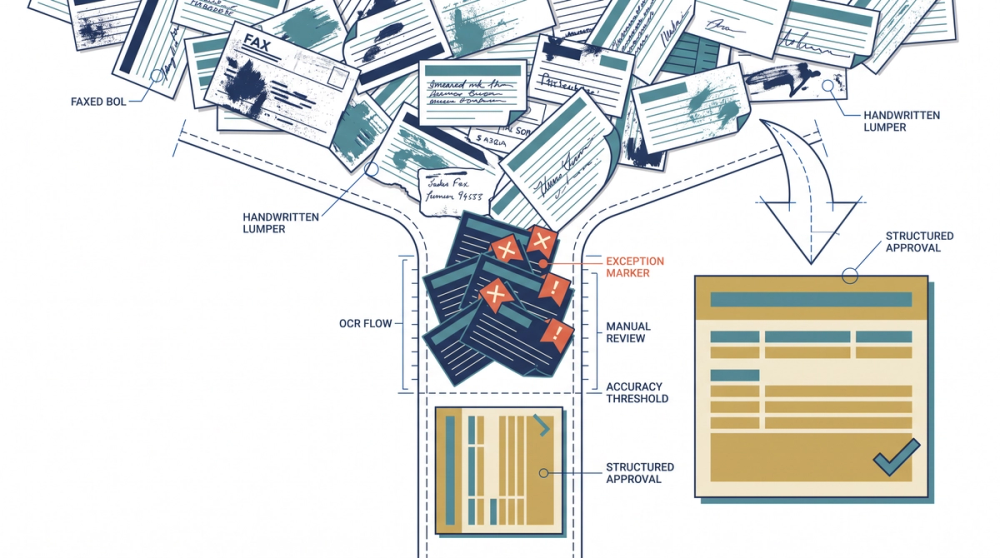
Now apply a straight-through rate. Say 80% of documents process without a touch and 20% land in exceptions that take 45 seconds each to clear. That is 720 documents automated and 180 exceptions at 45 seconds, or 2.25 hours. You went from 37.5 hours to 2.25 hours of document handling, about a 94% reduction on that task. Even at a much more conservative 60% straight-through rate with 2-minute exceptions, you save roughly 60% of the hours.
On the cost side, Mekari's roundup of logistics OCR software reports that document processing costs can drop by up to 15% with OCR in place. Treat that as a floor for a general logistics operation, not a ceiling for a brokerage where the manual work is concentrated in a handful of people.
The number that kills bad deals
Divide monthly software cost by hourly labor cost to get your break-even hours. At $400 a month software and $28 an hour, you need to save 14.3 hours a month for the tool to pay for itself. If your document volume only generates 12 hours of entry work, do not buy it yet. If it generates 37.5, the decision is not close.
Three Scenarios, Run End to End
The diagram above shows the routing logic. Here is what it looks like on actual loads.
Scenario 1: The 150-load brokerage that keeps its coordinator
A three-person brokerage runs 150 loads a month. The billing coordinator spends 6.5 hours a week on carrier packets and another 3.5 hours a week reconciling carrier invoices against rate cons. Total: 10 hours a week, about 43 hours a month, roughly $1,212 at $28 loaded. They add extraction software at $400 a month. Rate cons and typed BOLs process clean. Roughly 5% of BOLs (driver photos, faxed copies) kick to manual review, plus every handwritten lumper receipt. Net result: about 70% of total entry time removed, so 30 hours a month back, worth about $840, against $400 in cost. The coordinator does not get laid off. She takes over carrier compliance and claims follow-up, which was not getting done at all.
Scenario 2: The $340 lumper receipt
A driver submits a handwritten lumper receipt for $240. The carrier's invoice bills $340. A general OCR engine reads the smudged handwritten "2" as a "3" and records $340, matching the invoice perfectly. The system approves. Six weeks later the shipper's lumper report shows $240, and now you are chasing a $100 recovery from a carrier who has already been paid and is not returning calls. Recovery cost in staff time exceeds the recovery amount, so you eat it. Run that four times a quarter across 150 loads and you have lost real margin to a single digit. The fix is not better handwriting recognition. It is routing every handwritten dollar amount to human confirmation as a rule, regardless of confidence score.
Scenario 3: The detention claim that could not be proven
A carrier bills 3.5 hours of detention at $65 per hour, $227.50, on a load where the rate con authorized detention after 2 free hours with signed in and out times required. The BOL photo is legible on the signature but the handwritten arrival time is ambiguous: it could read 08:15 or 06:15. The extraction engine picks 06:15, which produces 3.5 billable hours and matches the carrier's number. Nobody questions it. The dock's gate log actually shows 08:15, which would have produced 1.5 hours, or $97.50 payable. Difference: $130 on one load. The control that catches this is not accuracy. It is a rule that flags any detention claim where the source time stamp scored below full confidence and requires a second document (gate log, GPS ping, or check-call record) before approval.
All three scenarios share the same shape: the failure is not that the software read the document. It is that nothing checked the extracted value against the terms you already agreed to. That is why freight document data extraction should hand its output straight into a comparison step rather than dumping fields into a record and calling it done.
Frequently Asked Questions
What software do freight brokers use?
Most brokerages run a TMS as the system of record (common options include McLeod, Tai, Turvo, Aljex, AscendTMS, and Revenova), a load board such as DAT or Truckstop, a carrier vetting tool like Carrier411 or Highway, accounting software such as QuickBooks, and increasingly a document automation layer for OCR and invoice matching. Smaller brokerages often start with a TMS and a load board only, then add document automation once manual entry passes about 15 hours a month. Descartes' overview of freight broker software outlines the core functions those tools cover.
Can freight brokers make 7 figures?
It is arithmetic, not mystery. At a 15% gross margin, generating $1 million in gross margin requires roughly $6.7 million in booked freight revenue. Individual agents at established brokerages and owners of small agencies do reach that level, but it typically requires either a high-volume dedicated lane portfolio or a book of specialized freight (drayage, flatbed, temperature-controlled) with better margins. Net income is a different question entirely, since carrier pay, staff, insurance, factoring, and unrecovered accessorial disputes all come out of that gross margin.
Who is the biggest freight brokerage?
C.H. Robinson is generally ranked the largest freight brokerage in North America by gross revenue, with Total Quality Logistics widely cited as the largest privately held truckload broker by volume. Rankings shift year to year depending on whether the list measures gross revenue, net revenue, or load count, so check the measurement basis before comparing two lists. For an SMB broker, the relevant takeaway is that the large players run heavy document automation, which is a fair part of how they hold administrative cost per load down.
What are some good apps for freight brokers?
Beyond the TMS, the apps that earn their seat cost for most SMB brokers are load board apps (DAT One, Truckstop), tracking and visibility tools (Macropoint, Project44, Trucker Tools), carrier vetting apps, and document capture apps that let drivers photograph a BOL or POD from the cab. Driver-side capture matters more than brokers expect, because it removes the two-day lag between delivery and paperwork that delays invoicing. Transflo's broker back-office automation is one example of tying mobile capture to office workflow.
How accurate is OCR on handwritten BOLs and lumper receipts?
Materially worse than on typed documents, and any vendor who gives you one accuracy number across all document types is not answering the question. Handwritten dollar amounts, time stamps, and piece counts are the highest-risk fields. The workable approach is not to expect handwriting recognition to improve enough. It is to set a rule that routes every handwritten financial field to human confirmation while letting the typed 80% of your document volume flow through untouched.
Sources
- What is freight broker software? — Descartes Systems Group
- Automating Document Processing for Enhanced Efficiency — Tai Software
- Freight Broker Software with Automated Document OCR — LaneSurf
- Automated Data Extraction for Freight Management — Artsyl Technologies
- Top 9 Logistics OCR Software to Cut 15% Document Costs — Mekari Expense
- Back-Office Automation Software for Brokers: Workflow AI — Transflo
- Automated Document Generation for Freight Brokers — ARK TMS
- Freight broker software guide 2026 — Truckstop
The Short Version Before You Buy
Automated document OCR is worth buying when your document volume produces more than about 15 hours a month of manual entry, and it pays best on the typed 70 to 80% of your document mix. It will not solve handwritten lumper receipts, and any vendor claiming otherwise is quoting character accuracy on clean scans. Judge tools on three things: straight-through rate by document type, how fast the exception screen clears a correction, and whether extracted data writes directly into your TMS and accounting system without a CSV in the middle.
Then ask the harder question. Reading the document correctly is step one. Checking what it says against what you agreed to pay is where the money actually shows up, which is why extraction should feed straight into invoice and rate confirmation reconciliation instead of stopping at data capture. Run a 200-document pilot on your own worst paperwork before you sign anything longer than a month.