How a Freight Audit Tool Works With Your TMS (Without Replacing It)
Researched and written with AI assistance. Reviewed by the Laneproof team.

A freight audit tool works with your TMS by pulling load-level data (rate cons, BOLs, accessorial terms, delivery timestamps) through an API or flat-file connection, then matching that data against carrier invoices to flag billing discrepancies your TMS was never built to catch. The TMS stays your system of record for load planning. The audit tool handles the math your billing team is doing manually.
Here's why this matters in dollars: a 3.8% overbill rate on $80,000 in monthly carrier invoices equals $3,040 in overcharges, according to Cass Information Systems' analysis of freight audit and payment patterns. Recovering even half of that ($1,520/month) covers most SMB-tier audit tool subscriptions. But the tool only works if it can actually talk to your TMS. And that's where most brokers hit a wall they didn't expect. This article walks through exactly how a freight audit tool works with TMS platforms, what data gets exchanged, where integration failures happen, and how to check whether your current setup is ready before you spend a dime.
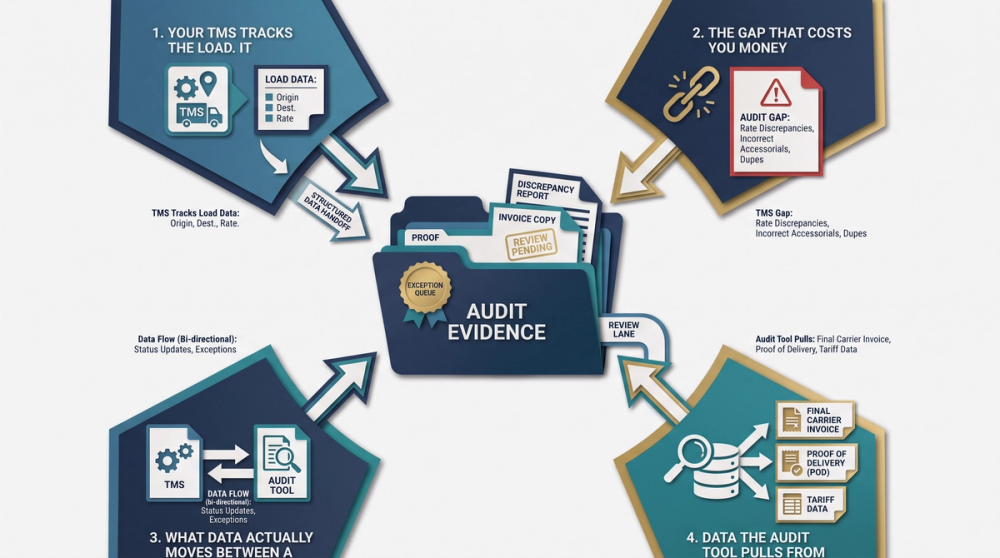
Your TMS Tracks the Load. It Doesn't Catch the Overbill.
Your TMS handles load tendering, dispatch, tracking, and status updates. It stores rate cons, assigns carriers, and logs delivery confirmations. What it does not do is compare what a carrier invoiced against what was agreed to on the rate con, then flag the difference. That's not a flaw in your TMS. It's a scope issue. According to DAT's guide to choosing TMS software for freight brokers, TMS platforms are built for operational execution: planning, routing, tracking, and documentation. Invoice auditing requires a different logic layer, one that cross-references financial documents against operational records and applies business rules to catch mismatches.
The gap that costs you money every week
When a carrier sends an invoice with a $250 layover charge, your TMS has the delivery timestamp showing same-day delivery. The data is right there. But your TMS doesn't compare the two, because it has no audit logic built in. Your billing coordinator or dispatcher has to manually pull up the rate con, check the BOL, verify the delivery time, and then dispute the charge. That process takes time. And when you're running 200 to 500 loads a month, time is the one thing you don't have.
As Cass Information Systems notes, most supply chain leaders are not utilizing TMS modules to perform freight audit and payment, even when basic reporting is available. The reason is simple: TMS reporting shows you what happened on a load. It doesn't tell you whether the bill for that load is correct. That distinction is the entire reason freight audit for SMB brokers exists as a separate function.
What Data Actually Moves Between a Freight Audit Tool and Your TMS
Understanding how a freight audit tool works with TMS starts with understanding what data gets exchanged, in which direction, and at what point in the load lifecycle. This isn't abstract. These are the specific fields your audit tool needs to pull from your TMS (or receive via file export) to do its job.
Data the audit tool pulls from your TMS
The core data layer includes everything on the rate con and load record. According to Infios' analysis of TMS and freight audit data overlap, freight audit and TMS functions share over 90% of the same data. That shared data includes:
- Load number and reference IDs used to match invoices to the correct shipment
- Rate con terms including linehaul rate, agreed-upon accessorials, and any exclusions (e.g., 'no liftgate,' 'no detention after 2 hours')
- Pickup and delivery timestamps from driver check-ins or EDI status updates
- Origin and destination zip codes for mileage and fuel surcharge validation
- BOL and POD documents attached to the load record
- Carrier SCAC code and MC number for matching against FMCSA registration data and carrier packet terms
- Accessorial fields specifying which services were authorized versus which were excluded
Data the audit tool sends back to your TMS
After the audit tool runs its comparison, it generates results that need to flow back into your TMS or your accounting system. This return data typically includes:
- Match/mismatch status for each invoice line item against the rate con
- Variance amounts showing exactly how much the carrier invoice exceeds the agreed rate
- Dispute flags with the specific field that triggered the mismatch (e.g., 'liftgate billed but excluded on rate con')
- Audit trail records documenting which checks were performed and when
This two-way data flow is what separates a real integration from a tool that just reads exported spreadsheets. When the connection works, your billing coordinator sees the flag inside the workflow they already use, not in a separate tab they have to remember to check.
Where the Integration Breaks Down (And What That Costs You)
The pitch for TMS integration freight audit always sounds clean: connect the systems, data flows, problems get flagged. In practice, there are four common failure points that eat into the ROI of an otherwise good audit tool.
Failure 1: Flat-file exports instead of live API connections
Scenario: A mid-size broker using MercuryGate discovers their freight audit tool can only pull flat-file exports (CSV or EDI 210 files) rather than live API data. The exports run once per day, creating a 24-hour lag between when the carrier submits an invoice and when the audit tool sees it. That lag matters. If the carrier's payment terms include a 48-hour dispute window, the broker effectively has 24 hours or less to catch the problem, file the dispute, and get documentation together.
Flat-file connections aren't always a dealbreaker. But you need to know before you buy whether your TMS supports API access or only file exports, and whether the audit tool can work within the timing constraints that creates.
Failure 2: Incomplete rate con data in your TMS
This one isn't a software problem. It's a data entry problem. If your dispatchers aren't entering accessorial terms into the TMS (or if the TMS doesn't have a structured field for accessorial exclusions), the audit tool has nothing to compare against. It can't flag a $175 liftgate charge as unauthorized if the rate con in your TMS doesn't explicitly say 'no liftgate.' The fix here is operational, not technical. Before connecting an audit tool, review your TMS load entry process. Check whether rate con terms, especially accessorial inclusions and exclusions, are being entered in structured fields rather than buried in free-text notes.
Failure 3: Mismatched reference IDs
The audit tool needs to match each carrier invoice to the correct load. It does this using reference numbers: load ID, PRO number, BOL number, or PO number. If your TMS uses one reference format and the carrier's invoice uses a different one, the match fails. The invoice sits in an 'unmatched' queue, and someone has to manually reconcile it. This is the exact manual invoice reconciliation bottleneck that audit tools are supposed to eliminate.
Failure 4: No webhook or notification layer
Even with a solid API connection, the audit tool needs a way to alert your team when it finds something. If the integration doesn't support webhooks, email alerts, or in-TMS notifications, flagged discrepancies sit in the audit tool's dashboard unseen. Your dispatcher doesn't log into a separate platform to check for billing issues. They live in the TMS. If the flag doesn't show up where they work, it doesn't get acted on.
Real-Time vs. Batch Processing: Which One Fits Your Load Volume
How often your audit tool checks invoices against TMS data depends on your load volume and your dispute window. There's no universal answer, but here's how to think about it.
Batch processing: fine for under 500 loads per month
If you're running 100 to 500 loads per month, a daily or twice-daily batch process usually works. The audit tool pulls a file export from your TMS (or receives a scheduled API call), processes all new invoices against rate con data, and returns a list of flagged items. Your billing coordinator reviews the flags once a day.
The risk with batch processing is timing. If your carriers have short dispute windows (48 hours or less from invoice submission), a daily batch gives you limited reaction time. You need to make sure the batch runs early enough in the day that someone can act on flags before the window closes.
Real-time processing: necessary above 1,000 loads per month
At higher volumes (1,000+ loads per month), the invoice volume makes batch processing unwieldy. You're looking at dozens of flags per day, and the batch approach means they all land at once. Real-time processing, where the audit tool checks each invoice as it arrives, spreads the workload and cuts dispute response times.
Real-time integration requires a live API connection, not flat-file exports. It also requires your TMS to support event-driven data access, meaning the audit tool can query load data on demand rather than waiting for a scheduled export. Not every TMS supports this. Before committing to a real-time audit workflow, confirm your TMS can handle the connection type.
According to Intellitrans' research on freight audit and payment with TMS, aligning audit and TMS data into a single source of truth for transportation data improves carrier communication and reduces the time spent on disputes. Whether you get there through batch or real-time depends on your volume and your TMS's technical capabilities.
How to Check If Your TMS Is Audit-Ready Before You Commit to a Tool
Before you evaluate any freight audit tool, run this compatibility check on your own TMS. It takes about an hour and saves you from buying a tool that can't connect properly.
Step 1: Check your TMS API documentation
Open your TMS admin panel or contact your TMS vendor. Ask specifically: Does this platform support REST API access for load-level data, including rate con terms, timestamps, and reference IDs? If the answer is 'yes, via our enterprise tier,' ask what that costs. Some TMS platforms gate API access behind premium plans. If the answer is 'no, but we support EDI 210/214 file exports,' you're limited to batch processing. That's workable, but you need to plan around it.
Step 2: Audit your rate con data entry process
Pull 20 random load records from the past 30 days. For each one, check:
- Is the linehaul rate entered in a structured numeric field (not just typed into a notes section)?
- Are accessorial terms (detention, lumper, liftgate, TONU) entered as structured data, with clear include/exclude flags?
- Are pickup and delivery timestamps populated from driver updates or EDI, or are they blank?
- Is the carrier's SCAC or MC number in a dedicated field that an external tool can query?
If more than 30% of your sample loads are missing structured accessorial terms or timestamps, the audit tool won't have the data it needs to catch billing discrepancies. Fix the data entry problem first.
Step 3: Map your reference ID format
Check how your TMS assigns load reference numbers. Then check how your top 10 carriers format their invoice reference numbers. Do they match? If your TMS uses a load ID format like 'LN-2024-00531' and the carrier's invoice references a PRO number like '908347261,' your audit tool needs a cross-reference table or a secondary matching field. Ask the audit tool vendor whether they support multi-field matching and how they handle unmatched invoices.
Step 4: Identify your dispute window constraints
Review your top 10 carriers' payment terms. How long do you have to dispute an invoice after receipt? If it's 48 hours, your integration can't have a 24-hour lag. If it's 7 days, batch processing is fine. Your dispute window sets the ceiling on how much latency your integration can tolerate.
Step 5: Test with a small data set before full deployment

Before signing an annual contract, ask the audit tool vendor for a pilot. Export 50 to 100 load records from your TMS and run them through the tool's matching engine. Check: Did it correctly match invoices to loads? Did it flag known discrepancies you've already caught manually? Did it miss anything? This test costs nothing but time, and it tells you more than any sales demo.
Examples: What These Integration Points Look Like in Practice
The following scenarios show exactly where the connection between a freight audit tool and your TMS either saves you money or fails to.
Example: Detention overbilling across 300 monthly loads
A broker running 300 loads per month has an average detention overbill of $45 per flagged load. Based on industry patterns documented by Cass Information Systems, roughly 12% of invoices contain freight billing discrepancies. That's 36 invoices per month with detention overcharges. At $45 each, that's $1,620 per month, or $19,440 per year, that never gets disputed because no one caught it. The TMS had the delivery timestamps. It just never compared them to what the carrier billed for detention. An audit tool connected to the TMS pulls those timestamps automatically, compares them to the carrier's detention claim, and flags the mismatch before payment goes out.
Example: Unauthorized liftgate charge caught in seconds
A carrier invoices a $175 liftgate fee on a load. The rate con in the TMS explicitly excludes liftgate service. The audit tool pulls the accessorial field from the TMS, compares it against the invoice line items, and flags the $175 charge within seconds. Without the tool, a billing coordinator would need to open the load record, pull up the rate con, scan for liftgate terms, and then file the dispute. That process takes 8 to 12 minutes per invoice. Across dozens of invoices per week, it adds up. Automated freight audit tools catch these mismatches without a human having to open a single document.
Example: The layover charge that the TMS couldn't flag
A carrier invoices a $250 layover charge. The BOL in the TMS shows a same-day delivery confirmation. The pickup and delivery timestamps are both within the same 8-hour window. There was no layover. The TMS logged the delivery. It stored the timestamps. But it never compared the carrier's $250 layover charge against those timestamps, because TMS platforms don't run that kind of logic. The audit tool pulls the delivery timestamp, checks it against the carrier's layover claim, and flags a $250 discrepancy. That's one load. Across a year, these charges compound.
Example: Manual reconciliation time savings
A dispatcher manually cross-referencing rate cons against carrier invoices in a TMS spends an average of 4.5 hours per week on reconciliation. That's checking linehaul rates, verifying accessorial charges, matching reference numbers, and filing disputes. A freight audit tool that pulls rate con data automatically from the TMS cuts that to under 30 minutes per week. That frees up 4 hours weekly, or over 200 hours per year, for work that actually moves freight. For a complete breakdown of which invoice line items to check first, start with detention, accessorials, and fuel surcharges.
Example: Monthly overbill recovery math
A 3.8% overbill rate on $80,000 in monthly carrier invoices equals $3,040 in overcharges, per patterns identified by Cass Information Systems. Recovering even 50% of that ($1,520/month) covers the subscription cost of most SMB-tier invoice reconciliation software. At full recovery, you're netting over $36,000 per year. That's margin you're currently giving away to carriers who bill higher than the rate con because they know most brokers don't have time to check every line.
Laneproof's reconciliation engine checks each of these fields automatically, matching carrier invoices against rate con terms pulled from your TMS and flagging variances before payment goes out.
Frequently Asked Questions About Freight Audit Tools and TMS Compatibility
Does a freight audit tool replace my TMS?
No. A freight audit tool sits alongside your TMS, not in place of it. Your TMS handles load planning, dispatch, tracking, and documentation. The audit tool handles invoice verification: comparing what the carrier billed against what was agreed on the rate con. They serve different functions and share data between them.
What if my TMS doesn't support API connections?
You can still use a freight audit tool, but you'll rely on file exports (CSV, EDI 210, or flat files) rather than a live data connection. This means batch processing instead of real-time auditing. It works, but adds latency. Check your carriers' dispute windows to make sure the lag doesn't cost you the ability to dispute charges in time.
How do I know if my TMS data is clean enough for an audit tool?
Pull 20 random load records and check whether rate con terms, accessorial inclusions/exclusions, and delivery timestamps are entered in structured fields. If more than 30% are missing key data, start by fixing your data entry process before connecting an audit tool. The tool can only flag what it can see.
Can a freight audit tool check carrier authority through FMCSA?
Some audit tools cross-reference carrier MC numbers against FMCSA registration data as part of the carrier invoice review process. This verifies that the entity billing you is the same entity authorized to haul freight. It's a compliance check, not a billing check, but it adds a layer of protection against double-brokered loads or unauthorized carriers.
How long does it take to set up a freight audit tool with my TMS?
For TMS platforms with documented API access, setup typically takes 1 to 3 weeks including data mapping, field matching, and a pilot test. For flat-file integrations, it can be faster (a few days) but requires ongoing maintenance to ensure export formats don't change without warning. Always run a pilot with 50 to 100 loads before full deployment.
Sources
- How to Choose the Best TMS Software for Freight Brokers — DAT
- 9 Reasons Logistics & Finance Leaders Don't Rely on TMS for Freight Audit and Payment — Cass Information Systems
- How TMS and Freight Audit Solve Supply Chain Complexity — Infios
- Freight Audit and Payment with TMS: Save Millions — Intellitrans
Your TMS Has the Data. Now Put It to Work.
Your TMS already stores the rate cons, timestamps, and load records that a freight audit tool needs. The problem isn't missing data. It's that no one is systematically comparing that data against what carriers actually bill. That gap costs SMB brokers thousands per month in undetected overcharges on detention, accessorials, and fuel surcharges.
Before you buy any tool, run the five-step compatibility check above. Confirm your TMS supports the connection type you need (API or file export), verify your rate con data is clean, and test with a small batch of loads. If you want to see how that process works with a tool built specifically for SMB freight operations, check Laneproof's pricing and plans to find a tier that matches your load volume.