Rate Confirmation Template Word: Every Field That Protects You
Researched and written with AI assistance. Reviewed by the Laneproof team.
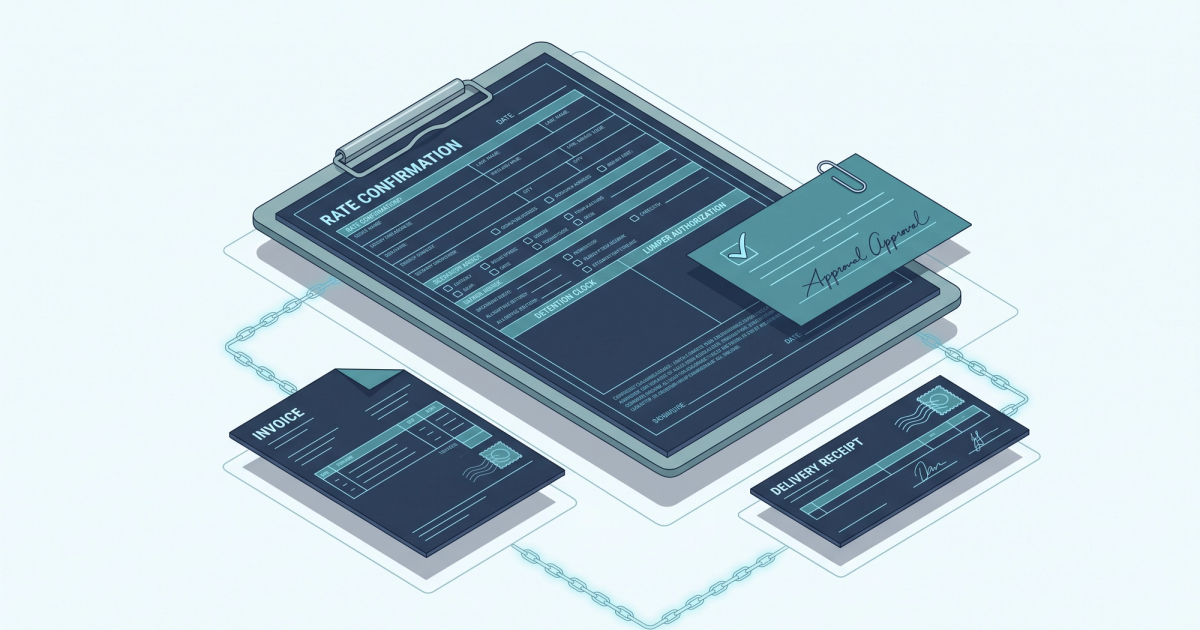
A carrier invoices you $450 for detention. You pull up the rate con and realize there's no detention clock start time defined anywhere in the document. No written basis to push back. You pay the full amount. This happens every week at brokerages running on free, bare-bones rate confirmation template Word files downloaded from the first Google result. The problem isn't that brokers skip rate cons entirely. It's that the templates they use are missing the exact fields that decide who wins a billing dispute. According to Truckstop.com's overview of critical freight broker documents, a rate confirmation is a legally binding agreement. If the binding agreement doesn't spell out detention terms, lumper authorization, accessorial pre-approval requirements, or cancellation policies, the carrier's invoice becomes the default truth. This guide gives you a free, editable Word template and a field-by-field explanation of what to include and why.
Why Most Free Rate Con Templates Get You Into Disputes Instead of Out of Them
Search for "rate confirmation template" and you'll find dozens of free downloads. Most of them include the basics: load number, pickup and delivery addresses, linehaul rate, commodity, and maybe a signature line. That covers about 60% of what you actually need. The other 40%, the clauses covering detention, lumpers, accessorials, TONU, and cancellation terms, is either missing entirely or buried in vague boilerplate that won't hold up when a carrier disputes your short-pay.
The Bare-Minimum Template Trap
According to Fulfill.com's breakdown of rate confirmation components, every rate confirmation must include a load number or reference ID, commodity description, weight, piece count, and pickup and delivery locations. Those are the core required fields. But required for what? Required to identify the load. Not required to protect you in a billing dispute. There's a big difference between a document that identifies a shipment and a document that defines what the carrier can and cannot invoice you for. Most free templates handle identification. Almost none handle protection.
What's Actually Missing
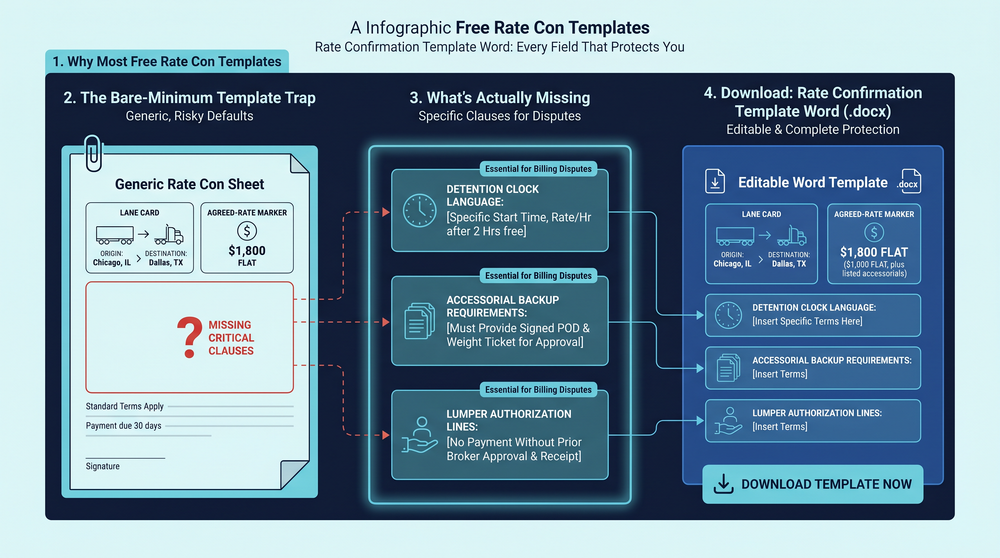
Here's what you won't find in a typical free rate con template:
- Detention clock start/stop definitions (appointment time vs. arrival time vs. check-in time)
- Lumper fee authorization requirements (pre-approval language, receipt requirements, maximum amounts)
- Accessorial pre-authorization clauses (who approves, how, and what documentation is needed)
- TONU and cancellation terms (cancellation window, flat rate vs. percentage, notification requirements)
- BOL timestamp requirements (mandating driver signature with arrival/departure times)
Every one of those gaps is a line item a carrier can invoice you for with no written defense on your side. If you've been using a generic template, take five minutes and review the fields most brokers skip. The list is shorter than you think, and fixing it takes less time than fighting one detention dispute.
Download: Rate Confirmation Template Word (.docx), Free and Editable
Below is a free, editable rate confirmation template in Word format. It's built for freight brokers who need more than a load ID and a signature block. This template includes dedicated sections for every field covered in this article, including detention language, lumper authorization, accessorial pre-approval, and TONU terms.
What's Included in This Template
The template is structured into four sections:
- Section 1: Load Identification. Load number, reference ID, broker and carrier contact info, MC/DOT numbers, commodity description, weight, piece count, and equipment type.
- Section 2: Route and Schedule. Pickup and delivery addresses, scheduled dates and times, appointment numbers, and special instructions.
- Section 3: Rate and Payment Terms. Linehaul rate, fuel surcharge (flat or percentage), payment terms (net days), and factoring instructions if applicable.
- Section 4: Dispute Protection Clauses. Detention clock definition, lumper fee authorization line, accessorial pre-approval requirements, TONU/cancellation terms, and required documentation for invoice submission.
Per Apex Capital's freight billing guide, carriers submitting freight bills to brokers need three documents: an invoice page, a rate confirmation sheet, and a Bill of Lading (BOL). Your rate con template needs to account for all three by specifying what documentation the carrier must attach. The template includes a documentation checklist at the bottom for exactly this purpose.
Why Word Format (.docx) Matters
PDF templates look clean but they're rigid. You can't easily add a clause, adjust detention language for a specific lane, or insert shipper-specific instructions without a paid editor. A Word (.docx) file lets you:
- Customize clause language per customer or lane without starting from scratch
- Add or remove fields as your operation grows
- Drop your logo and branding directly into the header
- Save multiple versions (reefer loads, flatbed loads, drayage) from one master template
A downloadable load confirmation form template from Template.net shows the standard field layout, but it's missing the dispute-protection sections entirely. That's the gap this template fills.
Field-by-Field Breakdown: What to Put in Each Section and Why It Matters
A rate confirmation is only as useful as its weakest field. Here's what goes into each section and, more importantly, what language to use so the document actually protects you.
Load Identification Fields
These are the fields that tie the rate con to a specific shipment. They seem obvious, but errors here cause invoice matching problems downstream.
- Load Number / Reference ID: Use your TMS-generated load number. This is the primary key for matching the rate con to the carrier invoice and BOL. If you're manually numbering loads, use a format that includes the date (e.g., 20250615-0042).
- Broker Info: Company name, MC number, physical address, phone, email. Include your accounts payable contact, not just the dispatcher who booked the load.
- Carrier Info: Legal entity name (not DBA alone), MC and DOT numbers, driver name, driver phone, truck number, trailer number. Getting truck and trailer numbers on the rate con makes it easier to match BOL signatures later.
- Commodity, Weight, Piece Count: Be specific. "General freight" is not a commodity description. Write "palletized dry grocery, 42,000 lbs, 22 pallets." This matters when accessorial charges for overweight or recount come in.
The FMCSA's Docket No. FMCSA-2023-0257 on broker transaction transparency acknowledges that brokers already routinely provide rate confirmation documents to motor carriers. This isn't optional paperwork. It's the industry standard, and regulators know it.
Route and Schedule Fields
- Pickup Location: Full address, facility name, contact name, phone number, appointment number (if applicable), and scheduled date/time.
- Delivery Location: Same detail as pickup. If there are multiple stops, list each with its own line and stop-off fee (if any).
- Appointment Time vs. FCFS: Specify whether the load is by appointment or first-come-first-served. This directly affects detention clock calculations, which we cover in detail below.
If you want a deeper look at how route and schedule fields interact with carrier billing, check out what brokers get wrong on rate confirmations and what it costs.
Rate and Payment Fields
- Linehaul Rate: Flat dollar amount. Avoid per-mile rates unless your TMS calculates them consistently and the carrier agrees to the mileage source (PC Miler, Google Maps, etc.).
- Fuel Surcharge: State whether it's included in the linehaul rate or listed separately. If separate, specify the calculation method and the index used (DOE national average, regional, etc.).
- Payment Terms: Net 15, Net 30, Quick Pay discount percentage. Be explicit. "Standard terms" is not a term.
- Invoice Submission Requirements: List what the carrier must submit to get paid. At minimum: signed rate con, carrier invoice, and signed BOL with timestamps. This is your first line of defense against invoices that don't match the agreed rate.
The Four Clauses Most Brokers Leave Blank (And What That Costs Them)
The fields above are table stakes. The four clauses below are where money is made or lost. Most brokers leave them blank, use vague language, or rely on a "standard terms" link at the bottom of the rate con that nobody reads.
1. Detention Clock Language
Detention is the single most disputed line item between brokers and carriers. The dispute almost always comes down to one question: when did the clock start?
What to write: "Detention free time begins two (2) hours after the scheduled appointment time, or two (2) hours after the driver checks in at the facility guard gate (whichever is later). Detention accrues at $XX.00 per hour after free time expires. Maximum detention per stop: $XXX.00. Carrier must provide signed BOL with check-in and check-out timestamps to invoice for detention."
Why it matters: Without this language, the carrier defines the clock. Some carriers start the clock at the scheduled appointment time regardless of when the truck actually arrived. Others start it at arrival, even if they showed up 47 minutes early. You need a written, signed definition on the rate con, or you're accepting whatever the carrier claims.
2. Lumper Fee Authorization
Lumper fees are common at grocery and retail distribution centers. The problem isn't the fee itself. The problem is surprise fees that nobody authorized.
What to write: "Lumper fees require written pre-authorization from [Broker Company Name] dispatch before the service is performed. Carrier must obtain a lumper receipt showing facility name, date, and dollar amount. Maximum authorized lumper fee: $XXX.00. Lumper fees submitted without pre-authorization and a valid receipt will not be paid."
Why it matters: A blank lumper line is an open invitation. The carrier pays a $275 lumper at delivery, submits the receipt with their invoice, and you have no written basis to deny it because your rate con didn't require pre-approval.
3. Accessorial Pre-Authorization
Accessorials cover everything from liftgate use to inside delivery to driver assist to pallet exchange. These charges add up fast, and carriers know which brokers don't require pre-authorization.
What to write: "All accessorial charges require written pre-authorization from [Broker Company Name] via email or TMS message before the service is performed. Accessorial charges submitted without prior written approval will not be honored. Approved accessorials must be invoiced with supporting documentation (photos, signed delivery receipt, etc.)."
For a closer look at the specific rate con fields carriers use to add charges, read how carriers use rate con fields to overbill you. It covers the math on accessorial overcharges with real numbers.
4. TONU and Cancellation Terms
Truck Order Not Used (TONU) charges happen when a load cancels after a carrier has been dispatched. Without a cancellation clause on the rate con, the carrier names their price after the fact.
What to write: "If the load is cancelled within [X] hours of scheduled pickup, a TONU fee of $XXX.00 will apply. Cancellations made more than [X] hours before scheduled pickup incur no charge. Carrier must notify [Broker Company Name] dispatch within 30 minutes of arriving at an empty or cancelled pickup to qualify for TONU payment. No TONU will be paid without notification and a photo of the empty dock or facility closure."
Why it matters: Without this language, a carrier can claim a dry run, self-report any dollar amount, and you have no contractual cap or documentation requirement to push back on.
How to Customize Your Rate Con for Detention, Lumper Fees, and Accessorials
A single template won't work for every lane, customer, or equipment type. Here's how to build variations from your master Word template without creating a documentation mess.
Lane-Specific Customization
Some shippers have notoriously long dwell times. Others have strict appointment windows with fast turns. Your detention language should reflect the reality of the facility, not a one-size-fits-all clause.
- High-dwell shippers: Extend free time to 3 or 4 hours but cap the hourly detention rate lower. This sets carrier expectations upfront and reduces disputes.
- Appointment-only facilities: Tie the detention clock strictly to the appointment time. If the carrier misses the window, detention doesn't start until they're rescheduled and checked in.
- Multi-stop loads: Add a per-stop detention section. Carriers will try to bill detention at every stop. Your rate con should specify which stops include free time and which don't.
Customer-Specific Lumper and Accessorial Rules
If you're running loads into grocery DCs, your lumper clause needs teeth. If you're moving industrial freight, lumper language might be irrelevant, but liftgate and inside delivery language becomes critical.
- Grocery/retail lanes: Include a specific lumper fee cap (e.g., "not to exceed $300"), a pre-authorization requirement, and a receipt requirement. Name the customer's common facilities if possible.
- Industrial/construction lanes: Remove lumper language. Add liftgate authorization fields, forklift availability notes, and driver assist requirements with weight limits.
- Reefer loads: Add temperature requirements, continuous monitoring clauses, and a data logger requirement. Reefer-related disputes often hinge on whether the carrier can prove temperature compliance.
Saving and Organizing Template Versions
Once you've customized your rate con template for different scenarios, save each version with a clear naming convention:
- RateCon_Master_v3.docx (your base template)
- RateCon_GroceryDC_Detention4hr.docx
- RateCon_Flatbed_LiftgateAuth.docx
- RateCon_Reefer_TempClause.docx
As noted by Turing IT Labs' analysis of freight rate confirmation workflows, rate confirmation processing is a significant time drain in brokerage operations, especially for teams handling hundreds of loads per month. Having pre-built Word templates organized by lane type cuts the per-load document prep time considerably. For brokerages processing high document volumes, tools that automatically extract and match rate con data to invoices can reduce reconciliation time even further by pulling field data directly from your documents.
Real Scenarios: How Blank Fields Cost Brokers Real Money
Theory is useful. Dollar amounts are better. Here are concrete examples of how missing or vague rate con fields turn into direct margin losses.
Example 1: The $450 Detention Charge With No Clock Definition
A carrier delivers a load to a distribution center. The scheduled appointment was 10:00 AM. The carrier's invoice includes a $450 detention charge, claiming they waited 6 hours. The broker pulls up the rate con: it lists the delivery address and appointment time, but there's no detention clause. No free time definition. No clock start rule. No documentation requirement. The carrier says the clock started at the appointment time. The shipper says the truck arrived 47 minutes late, so free time shouldn't have started until check-in. Without a signed BOL timestamp and a rate con that defines when the clock starts, the broker is stuck in the middle. Result: the broker pays $450 because the rate con offered no written defense.
Example 2: The $275 Lumper Fee Nobody Authorized
A carrier delivers a load to a grocery DC. At the dock, the facility requires a lumper service. The carrier pays $275 out of pocket and submits the receipt with their freight invoice. The broker's rate con has no lumper fee section. No pre-authorization language. No maximum cap. No receipt requirement. The $275 charge hits the broker's AP department, and they have no contractual basis to reject it. The shipper won't reimburse because the broker's contract with the shipper has its own lumper language (capped at $200 with prior approval). The broker absorbs the $75 difference plus the full $275 if the shipper disputes. Result: $275 lost on a charge that a single paragraph on the rate con would have prevented.
Example 3: The $620 TONU With No Cancellation Terms
A shipper cancels a load 4 hours before pickup. The carrier was already dispatched and had repositioned their truck. The carrier submits a TONU invoice for $620. The broker's rate con has no cancellation clause, no TONU flat rate, and no notification requirement. The carrier self-reported the $620 figure, and the broker has no written agreement specifying what a TONU should cost. A standard TONU clause with a $250 flat rate and a 6-hour cancellation window would have either eliminated the charge (if cancelled outside the window) or capped it at $250. Result: the broker pays $370 more than necessary because the rate con had no TONU language.
Example 4: The $185 Liftgate Accessorial With No Pre-Authorization Clause
A carrier invoice includes a $185 liftgate charge. The delivery location was a residential address that required liftgate service. The rate con listed the delivery address but had no accessorial clause, no pre-authorization requirement, and no language about additional equipment charges. The carrier's position: liftgate was required by the delivery conditions, so the charge is valid. The broker's position: we never agreed to pay for liftgate service. Without a pre-authorization clause, the carrier wins this dispute every time. The charge sticks. Now multiply this across dozens of loads per month. Result: $185 per occurrence on a charge that a two-sentence clause would have put back in the broker's control.
A rate confirmation with blank clauses doesn't just miss information. It actively works against you. Every empty field is a field the carrier gets to define after the fact, on their invoice, in their favor.
Frequently Asked Questions About Rate Confirmation Templates
Is a rate confirmation legally binding?
Yes. According to Truckstop.com's documentation on freight broker forms, a rate confirmation is classified as a legally binding agreement between the freight brokerage and carrier once signed. This means the terms on the document, including rate, detention, accessorial clauses, and cancellation terms, are enforceable. It also means blank or vague terms leave you without legal footing when disputes arise.
What documents does a carrier need to submit with their invoice?
Per Apex Capital's freight billing guide, carriers submitting freight bills need three documents: an invoice page, the signed rate confirmation sheet, and a signed Bill of Lading (BOL). Your rate con should specify this requirement explicitly so carriers can't submit invoices without supporting documentation. Adding a documentation checklist to the bottom of your rate con template makes this clear at the point of signing.
Should I use a Word template or a PDF for rate confirmations?
Word (.docx) gives you flexibility that PDF doesn't. You can customize clauses per lane, add shipper-specific instructions, and maintain multiple template versions from a single master file. PDF works fine for final distribution (most brokers save to PDF after filling in the Word template), but editing a PDF requires paid software. Start in Word, customize, then export to PDF for the carrier's signed copy.
How often should I update my rate confirmation template?
Review your template quarterly or whenever you notice a pattern in carrier disputes. If you're seeing repeated detention claims at specific facilities, update your detention language for those lanes. If a new accessorial charge keeps appearing (pallet exchange, for example), add a clause to address it. Your template should evolve with your operation, not sit unchanged for years.
What's the difference between a rate confirmation and a carrier packet?
A carrier packet is the onboarding bundle: W-9, certificate of insurance, operating authority verification, and your broker-carrier agreement. A rate confirmation is load-specific. It covers the terms for a single shipment. The broker-carrier agreement in the packet sets general business terms. The rate con sets the specific rate, route, and clauses for each load. Both are important, but the rate con is where per-load disputes are won or lost.
Build Your Rate Con to Win Disputes Before They Start
The rate confirmation template sitting in your TMS or shared drive right now is either protecting your margins or quietly eroding them. Every blank detention field, missing lumper clause, and absent accessorial pre-authorization is a line item a carrier can invoice you for with no written pushback on your side.
Download the free Word template linked in this article. Customize it for your top lanes. Add detention clock definitions, lumper authorization requirements, accessorial pre-approval language, and TONU terms. Then make sure every rate con that goes out to a carrier has those fields filled in, not blank, not "see standard terms," but filled in with specific dollar amounts and documentation requirements.
Once your rate con template is solid, the next bottleneck is matching those terms against incoming carrier invoices. That's where most brokerages lose time: manually comparing rate con fields to invoice line items, load by load. See how Laneproof handles this workflow with automatic document extraction and invoice matching. Plans start at $149/month for up to 400 documents.
Sources
- FMCSA Docket No. FMCSA-2023-0257: Transparency in Property Broker Transactions — Federal Motor Carrier Safety Administration
- Freight Broker Documents: 10 Important Forms — Truckstop.com
- Rate Confirmation: Definition, Components & Best Practices — Fulfill.com
- How to Build a Freight Bill Like A Pro — Apex Capital Corp
- Freight Rate Confirmations: Why They Drain Time and How to Automate — Turing IT Labs
- Load Order Confirmation Form Template (.docx) — Template.net